
Author
Java introduced several modern language improvements in versions 13 to 15+ to make code cleaner, more readable, and easier to maintain. These updates focus on improving developer experience by reducing boilerplate and simplifying common tasks.
These features are especially useful in real-world applications where clarity and debugging play a major role.
In this section, we focus on two important improvements:
Text Blocks are a modern Java feature that makes working with multi-line strings much easier and cleaner. They remove the need for complex string concatenation and improve overall readability.
Text Blocks allow you to write multi-line strings using triple quotes (""") while preserving formatting like line breaks and indentation.
? In simple words: A clean and readable way to write long text (like JSON, HTML, or SQL) without using
+or escape characters.
Old Way (Before Text Blocks)
String json = "{\n" +
              "  \"name\": \"Java\",\n" +
              "  \"version\": \"17\"\n" +
              "}";
Problems
+ operators\\n, \\") make code messyNew Way (Text Blocks)
String json = """
{
  "name": "Java",
  "version": "17"
}
""";
Benefits
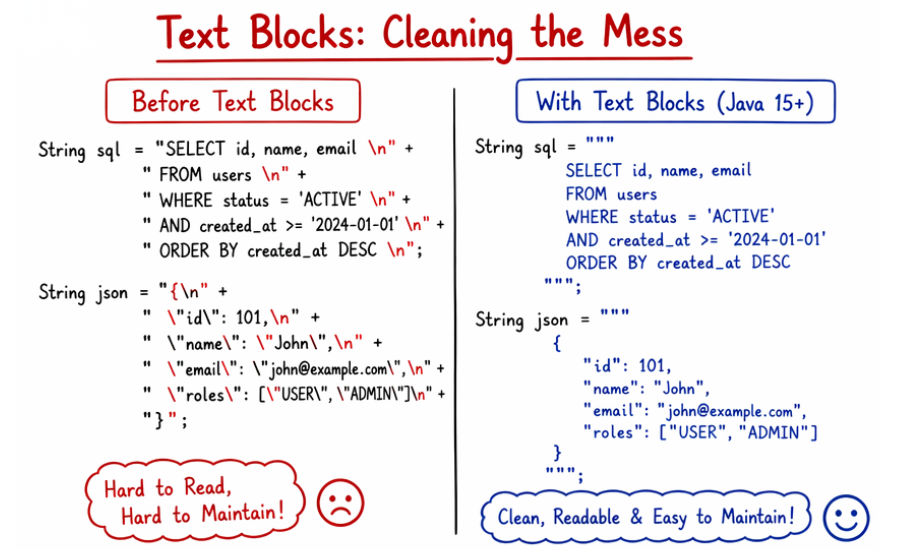
Text Blocks provide a cleaner way to work with multi-line text in Java, making code easier to read and maintain.
\\n and \\" .Text Blocks are especially useful when dealing with structured or formatted text in real applications.
When using Text Blocks in Java, there are a few important rules and behaviors to keep in mind for correct usage and formatting.
""" should be followed by a new line for proper formatting.Java 14 introduced Helpful NullPointerExceptions to make debugging easier by providing detailed error messages. This helps developers quickly identify the exact cause of a null-related issue.
A NullPointerException (NPE) occurs when you try to use a variable that has a null value (i.e., it does not point to any object in memory).
Problem Before Java 14
String name = null;
System.out.println(name.length());
Output
NullPointerException
Problems
After Java 14 (Helpful NPE)
String name = null;
System.out.println(name.length());
Output
Cannot invoke "String.length()" because "name" is null
Now you can clearly identify:
null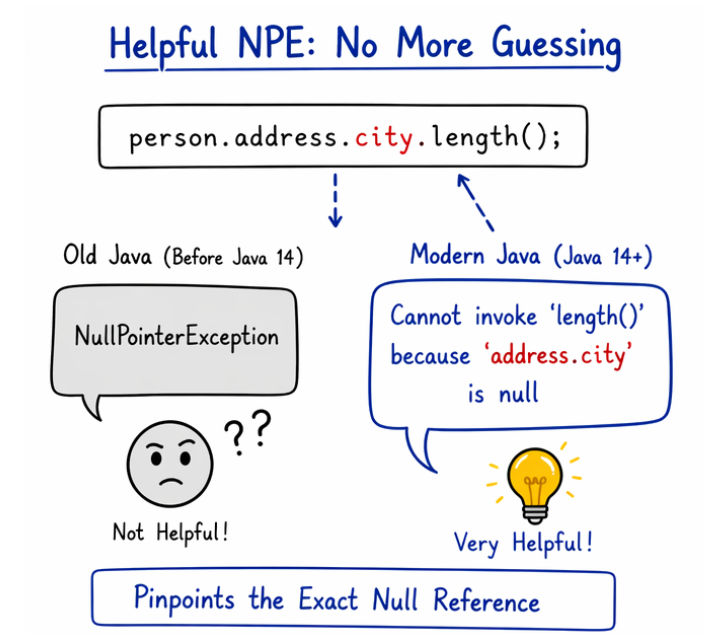
class User {
    String name;
}

User user = null;

System.out.println(user.name);
Output:
Cannot read field "name" because "user" is null
Helpful NullPointerExceptions in modern Java automatically provide detailed error messages without requiring any extra code.
? This makes debugging faster and more efficient, especially in large applications.
Helpful NullPointerExceptions make debugging much easier by providing clear and meaningful error messages.
? Overall, this feature makes error handling more transparent and developer-friendly.
Modern Java improvements like Text Blocks and Helpful NullPointerExceptions make development more efficient and code more maintainable.
These features should be used in scenarios where they provide clear benefits in readability and debugging.
Modern Java improvements like Text Blocks and Helpful NullPointerExceptions significantly enhance the developer experience by making code cleaner and easier to work with.
They simplify common tasks and reduce unnecessary complexity in everyday coding.
? Together, these features help developers write clean, maintainable, and modern Java code, making them essential for today’s Java development.
