
Durgesh Tiwari
Author
Java provides powerful features to control how output is displayed in a structured and readable format. The Formatter class and formatting methods help format text, numbers, and data instead of printing raw values.
This makes output more professional and user-friendly in real applications.
It is commonly used in:
Report generation systems
Console-based applications
Banking statements and invoices
Logging and debugging output
Enterprise-level data display
The Formatter class in Java is used to format strings, numbers, dates, and other data types into a structured and readable format.
It belongs to:
java.util.FormatterIn simple words: Formatter helps in designing clean and professional output in Java applications.
Java also provides easy formatting using printf() and String.format() methods.
Example: printf() Formatting
public class Test {
    public static void main(String[] args) {

        int id = 101;
        String name = "Rahul";
        double salary = 45000.5;

        System.out.printf("ID: %d | Name: %s | Salary: %.2f", id, name, salary);
    }
}
Output
ID: 101 | Name: Rahul | Salary: 45000.50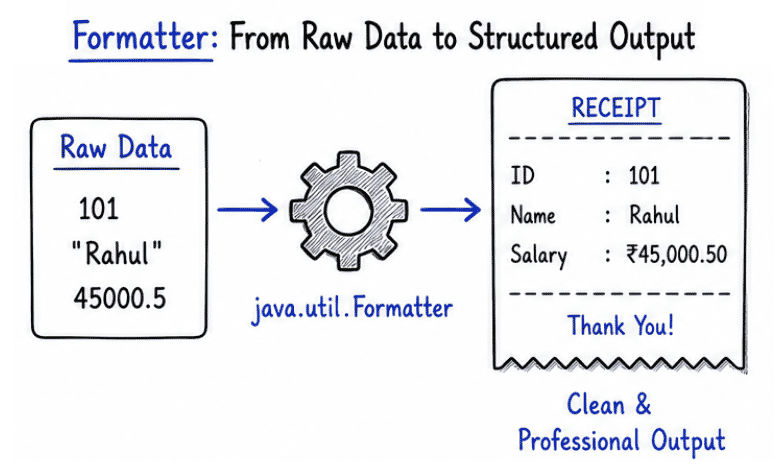
Output formatting is important because it makes data clear, structured, and easy to read.
Without formatting, output looks messy and difficult to understand, especially when dealing with multiple values.
Example (Without formatting)
Name: Rahul Age:25 Salary:50000Example (With formatting)
Name   : Rahul
Age    : 25
Salary : 50000
👉 Proper output formatting improves readability, user experience, and gives a more professional look to Java applications.
Java provides multiple ways to format output in a structured and readable format:
System.out.printf()
String.format()
Formatter class
Format specifiers
Format specifiers are special symbols used to define how different types of data should be displayed in output.
Common Format Specifiers
Specifier | Meaning | Example |
|---|---|---|
| Integer values | 10 |
| String values | Java |
| Floating-point numbers | 10.5 |
| Single character | A |
| Boolean values | true |
public class Test {
    public static void main(String[] args) {

        String name = "Rahul";
        int age = 25;
        double salary = 50000.75;

        System.out.printf("Name: %s%n", name);
        System.out.printf("Age: %d%n", age);
        System.out.printf("Salary: %.2f%n", salary);
    }
}
Output
Name: Rahul
Age: 25
Salary: 50000.75
👉 This example shows how format specifiers like %s, %d, and %.2f are used to display structured and readable output in Java.
import java.util.Formatter;

public class Test {
    public static void main(String[] args) {

        Formatter formatter = new Formatter();

        formatter.format("Name: %s Age: %d Salary: %.2f",
                "Amit", 28, 75000.50);

        System.out.println(formatter);

        formatter.close();
    }
}
Output
Name: Amit Age: 28 Salary: 75000.50👉 This example shows how the Formatter class creates structured output by applying format specifiers like %s, %d, and %.2f.
Java allows you to align output using width specifiers, which help in creating structured and table-like formatting.
Left alignment is done using %-width.
public class Test {
    public static void main(String[] args) {

        System.out.printf("|%-10s|%-5d|%n", "Java", 101);
    }
}
Output
|Java |101 |Right alignment is done using width specifiers without the minus sign (%width). It aligns the output to the right side within the given space.
public class Test {
    public static void main(String[] args) {

        System.out.printf("|%10s|%5d|%n", "Java", 101);
    }
}
Output
| Java| 101|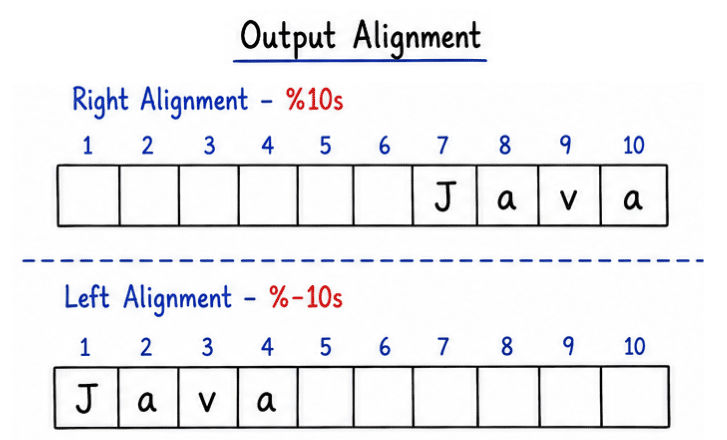
Decimal precision allows you to control how many digits appear after the decimal point using %.nf.
Decimal Precision
public class Test {
    public static void main(String[] args) {

        double value = 12.34567;

        System.out.printf("%.2f", value);
    }
}
Output
12.35👉 %.2f means the number will be displayed with 2 digits after the decimal point.
Java also supports date formatting using Formatter specifiers.
import java.util.Date;

public class Test {
    public static void main(String[] args) {

        Date date = new Date();

        System.out.printf("%tF", date);
    }
}
Output
2026-05-12👉 %tF formats the date in YYYY-MM-DD format, which is commonly used in databases and APIs.
Specifier | Meaning |
|---|---|
| Date (YYYY-MM-DD) |
| Time (HH:MM:SS) |
| Full date and time (complete format) |
Real Examples
import java.util.Date;

public class Test {
    public static void main(String[] args) {

        Date date = new Date();

        System.out.printf("Date: %tF%n", date);
        System.out.printf("Time: %tT%n", date);
        System.out.printf("Full: %tc%n", date);
    }
}
Output
Date: 2026-05-12
Time: 14:30:45
Full: Tue May 12 14:30:45 IST 2026
👉 These specifiers are commonly used in reports, logs, and system outputs to display date and time in different formats.
Formatter and output formatting are widely used in Java applications to display data in a clean, structured, and readable format.
They are commonly used in:
Banking statements (transaction details, balances)
Invoice generation systems (bills, pricing formats)
Report generation systems (employee/student reports)
Logging systems (debugging and system logs)
Console-based dashboards (real-time data display)
API response formatting (structured JSON/text output)
Data export tools (CSV files, logs, reports)
public class Test {
    public static void main(String[] args) {

        String name = "Rahul";
        double balance = 12500.75;

        System.out.printf("Customer: %s%n", name);
        System.out.printf("Balance : ₹%.2f%n", balance);
    }
}
Output
Customer: Rahul
Balance : ₹12500.75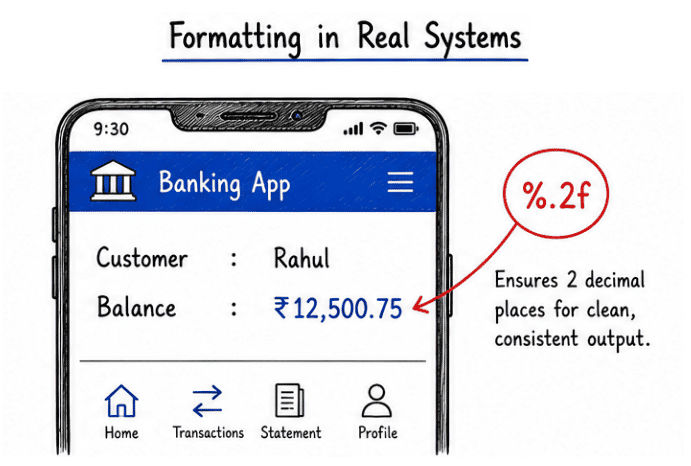
👉 This example shows how output formatting is used in banking systems to display structured and professional financial statements.
Produces clean and readable output.
Improves professional data presentation.
Helps in easy alignment of text, numbers, and tables.
Supports formatting for strings, numbers, and dates.
Very useful for report generation and logging systems.
Enhances overall user experience in console and application output.
Although output formatting in Java is very useful, it also has some limitations:
Can be slightly complex for beginners to understand at first.
Incorrect format specifiers can produce wrong output or runtime issues.
Not useful or necessary for very simple print statements.
Overuse can make code harder to read in small programs.
Formatter and output formatting in Java help developers create clean, structured, and professional output.
They make it easier to present data in a readable and organized way across different applications.
Improves code and output readability
Widely used in real-world applications
Essential for reports, logs, invoices, and financial systems
Helps in building professional-grade Java applications
👉 Overall, output formatting is an important feature for displaying data in a clear and structured manner in Java programs.
