
Durgesh Tiwari
Author
Regular Expressions (Regex) are one of the most powerful tools in Java for searching, matching, extracting, and validating text. They help developers define patterns that can identify specific character sequences within strings.
Regex is commonly used in form validation, text processing, data extraction, log analysis, search functionality, and input verification.
In simple words: Regex allows developers to check whether text follows a specific format without writing complex validation logic.
A Regular Expression (Regex) is a sequence of characters that defines a search pattern. Java provides built-in regex support through the java.util.regex package.
Regex can be used to:
Validate user input
Search text patterns
Extract information from strings
Replace matching text
Filter data
Validate email addresses
Verify phone numbers
Check password strength
Extract URLs from text
Parse log files
👉 Regex simplifies complex string processing tasks.
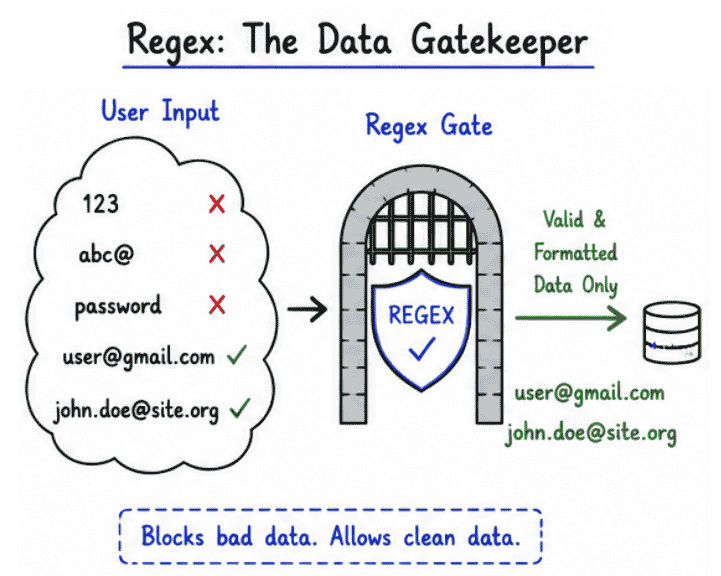
Modern applications receive large amounts of user input. Without proper validation, incorrect or malicious data can enter the system.
Improves data quality
Reduces validation code
Prevents invalid user input
Enhances application security
Makes input validation faster
Registration forms
Login systems
Banking applications
E-commerce platforms
API request validation
Java provides multiple ways to work with regular expressions. The most commonly used approaches are String.matches(), Pattern, and Matcher.
The matches() method is the simplest way to check whether a string follows a specific regex pattern.
String email = "[email protected]";

boolean valid =
        email.matches(
                "^[A-Za-z0-9+_.-]+@[A-Za-z0-9.-]+$");

System.out.println(valid)The Pattern class is used to compile a regular expression into a reusable pattern object.
Pattern pattern =
        Pattern.compile("\\\\d+");
Compiling a regex pattern once improves performance when the same pattern is used multiple times.
The Matcher class applies a compiled pattern to a given input string and performs matching operations.
Matcher matcher =
        pattern.matcher("12345");

System.out.println(
        matcher.matches());
👉 Pattern and Matcher are commonly used in enterprise applications for better performance.
Regular expressions use special symbols called metacharacters to define matching rules and search patterns. These symbols help developers perform powerful text validation and pattern matching operations.
Symbol | Meaning |
|---|---|
| Matches any single character |
| Matches zero or more occurrences |
| Matches one or more occurrences |
| Matches zero or one occurrence |
| Matches any digit (0-9) |
| Matches any non-digit character |
| Matches letters, digits, and underscore |
| Matches characters other than word characters |
| Matches whitespace characters |
| Matches the beginning of a string |
| Matches the end of a string |
These metacharacters are commonly used to validate emails, phone numbers, passwords, URLs, and other text-based input.
Example
\\\\d+Matches:
123
4567
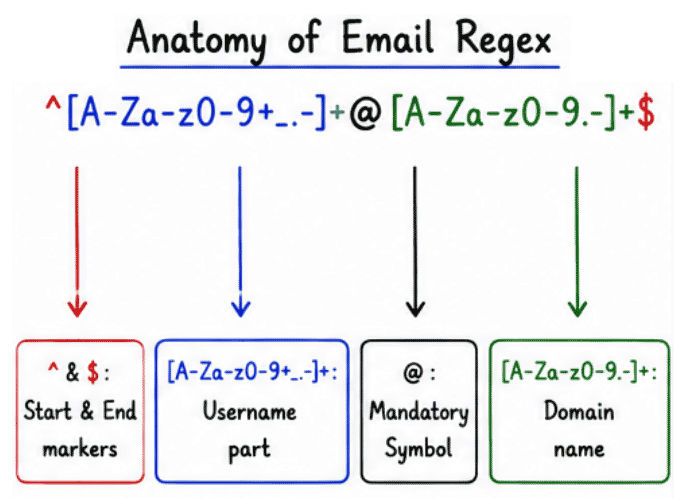
99999Email validation ensures that users enter a properly formatted email address.
^[A-Za-z0-9+_.-]+@[A-Za-z0-9.-]+$Example
String email = "[email protected]";

System.out.println(
        email.matches(
                "^[A-Za-z0-9+_.-]+@[A-Za-z0-9.-]+$"));
Common Use Cases
User registration forms
Login systems
Contact forms
Newsletter subscriptions
Account verification systems
Validates a 10-digit mobile number.
^[0-9]{10}$Example
String phone = "9876543210";

System.out.println(
        phone.matches(
                "^[0-9]{10}$"));
Common Use Cases
OTP verification systems
User registration forms
Contact information forms
Customer profile management
Mobile number verification
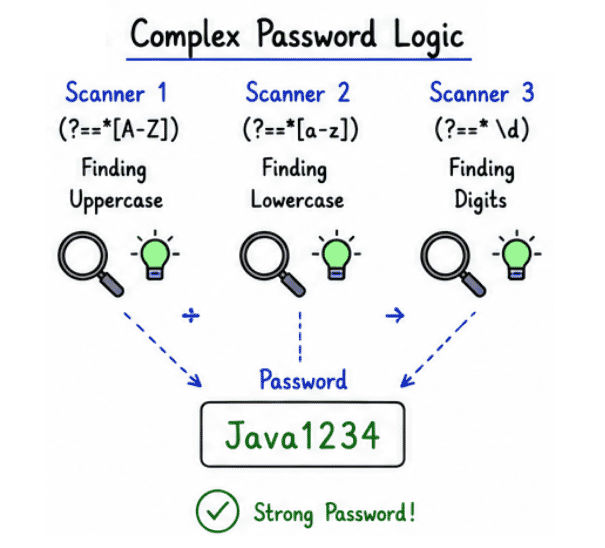
Password validation is used to ensure that users create strong and secure passwords. A well-designed password policy helps protect applications from unauthorized access and common security attacks.
Validation Rules
At least one uppercase letter
At least one lowercase letter
At least one digit
Minimum 8 characters long
^(?=.*[A-Z])(?=.*[a-z])(?=.*\\\\d).{8,}$Example
String password = "Java1234";

System.out.println(
        password.matches(
                "^(?=.*[A-Z])(?=.*[a-z])(?=.*\\\\d).{8,}$"));
Common Use Cases
Authentication systems
User registration forms
Banking applications
Admin portals
Enterprise security systems
Username validation helps ensure that users create usernames that follow predefined rules and maintain consistency across the application.
Regex Pattern
^[A-Za-z0-9]{5,15}$Validation Rules
Only letters and numbers are allowed
No spaces or special characters
Length must be between 5 and 15 characters
Example
String username = "JavaUser123";

System.out.println(
        username.matches(
                "^[A-Za-z0-9]{5,15}$"));
Common Use Cases
User registration systems
Social media platforms
Gaming applications
Online forums
Employee and customer portals
PIN code validation is used to verify whether a postal code follows the required format. In India, a PIN code consists of exactly 6 numeric digits.
Regex Pattern
^[0-9]{6}$Example
String pin = "226001";

System.out.println(
        pin.matches(
                "^[0-9]{6}$"));
Common Use Cases
Address verification forms
E-commerce checkout systems
Delivery and logistics applications
Customer registration portals
Location-based services
Aadhaar number validation is used to verify whether an Aadhaar number contains exactly 12 numeric digits. This basic validation helps ensure that users enter the correct format before further verification.
Regex Pattern
^[0-9]{12}$Example
String aadhaar = "123456789012";

System.out.println(
        aadhaar.matches(
                "^[0-9]{12}$"));
Common Use Cases
KYC systems
Government portals
Banking applications
Insurance platforms
Customer verification systems
URL validation helps verify whether a web address starts with a valid protocol such as HTTP or HTTPS.
Regex Pattern
^(https?://).+$Example
String url =
        "<https://example.com>";

System.out.println(
        url.matches(
                "^(https?://).+$"));
Common Use Cases
Website submission forms
Social media profile links
API endpoint validation
CMS and blogging platforms
Date validation ensures that users enter dates in a specific format.
Regex Pattern
^\\\\d{2}-\\\\d{2}-\\\\d{4}$Example
String date =
        "12-05-2026";

System.out.println(
        date.matches(
                "^\\\\d{2}-\\\\d{2}-\\\\d{4}$"));
Note: This pattern validates only the format. It does not check whether the date is actually valid (for example, 32-15-2026 would still match).
Common Use Cases
Registration forms
Booking systems
Employee management applications
Report generation systems
This pattern is used when an input should contain only alphabetic characters.
Regex Pattern
^[A-Za-z]+$Example
String name = "Rahul";

System.out.println(
        name.matches(
                "^[A-Za-z]+$"));
Common Use Cases
First name and last name validation
City name validation
Country name validation
Educational forms
This pattern ensures that the input contains only numeric digits.
Regex Pattern
^[0-9]+$Example
String number = "12345";

System.out.println(
        number.matches(
                "^[0-9]+$"));
Common Use Cases
Numeric IDs
Quantity fields
Product codes
Age and score validation
Following a few best practices can make regex patterns easier to understand and maintain.
Keep patterns simple and readable
Reuse Pattern objects when possible
Validate input on both client and server sides
Test edge cases carefully
Document complex regex expressions
Well-structured regex patterns improve code readability, performance, and maintainability.
Even small mistakes in regular expressions can lead to incorrect validation results. One of the most common mistakes is forgetting to use anchors.
Wrong:
\\\\d{10}Correct:
^\\\\d{10}$Without ^ and $, the pattern may match digits even when extra characters exist before or after them. Anchors ensure that the entire input matches the required pattern.
Writing overly complex regex patterns can make code difficult to read, debug, and maintain. Whenever possible, prefer simple and clear expressions that are easy to understand.
Wrong:
.Correct:
\\\\.In regex, . matches any character. Using \\\\. ensures that the pattern matches an actual dot (.).
Regular expressions are powerful, but they are not always the best solution. For simple string checks, built-in String methods are often easier to read and more efficient.
contains()
startsWith()
endsWith()
Choose regex only when pattern matching is required; otherwise, simple string methods can make the code cleaner and easier to maintain.
Regular expressions are widely used in modern software development for validating, searching, and processing text data efficiently.
Spring Boot applications
REST API input validation
User registration and login forms
Log file analysis
Search and filtering systems
Data extraction and text processing
Enterprise business applications
Common Regex Patterns are an essential part of Java development and are widely used for validating user input, processing text, and improving data quality. They help developers create cleaner validation logic and build more reliable applications.
By understanding commonly used patterns such as email validation, phone number validation, password validation, URL validation, and date validation, developers can solve many real-world input validation challenges efficiently.
Learning regex is a valuable skill for Java developers because it is frequently used in web applications, enterprise systems, APIs, and data-processing solutions.
