
Durgesh Tiwari
Author
Locale in Java is a class used to represent a specific geographical, cultural, or language region. It helps Java applications display region-specific information such as language, date, time, currency, and number formatting.
In simple words:
Localehelps Java applications support different languages and regional settings.
The Locale class is part of the java.util package.
It represents:
Language
Country/Region
Cultural preferences
Java uses the Locale class to support:
Internationalization (i18n)
Localization (l10n)
Region-specific application behavior
Locale helps applications behave differently for users from different countries.
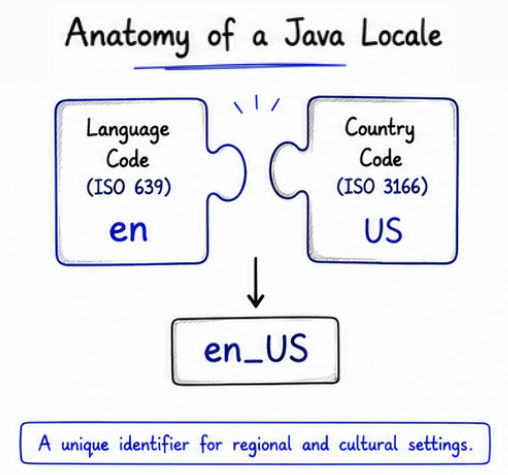
Modern applications are used by people from different countries, languages, and regions. The Locale class helps applications display content according to regional and cultural preferences.
With Locale, applications can:
Support multiple languages
Format currency, numbers, and dates correctly
Provide region-specific user experience
Support localization and internationalization
Build globally accessible applications
Locale is widely used in enterprise applications, banking systems, e-commerce platforms, travel applications, and multilingual websites.
A Locale in Java is mainly created using:
Language code
Country code
These codes follow international ISO standards.
Language | Code |
|---|---|
English |
|
Hindi |
|
French |
|
Japanese |
|
Country | Code |
|---|---|
United States |
|
India |
|
United Kingdom |
|
Japan |
|
These language and country codes are combined to create locale identifiers such as:
en_US → English (United States)
hi_IN → Hindi (India)
ja_JP → Japanese (Japan)
Locale uses these codes to provide region-specific formatting and localization support in Java applications.
A Locale object in Java is created using language and country codes. These codes help Java identify the user’s regional and language settings.
Syntax
Locale locale = new Locale(language, country);
Example
import java.util.Locale;

public class Test {

    public static void main(String[] args) {

        Locale us = new Locale("en", "US");

        System.out.println(us);
    }
}
Output
en_USHere:
"en" represents the English language
"US" represents the United States
Together, they create a Locale for English language users in the United States.
The following are some commonly used Locale identifiers in Java:
Locale | Meaning |
|---|---|
| English (United States) |
| English (United Kingdom) |
| Hindi (India) |
| French (France) |
| Japanese (Japan) |
Java automatically detects the system’s default locale based on the user’s operating system and regional settings.
The default locale is commonly used when no specific locale is provided in the application.
import java.util.Locale;

public class Test {

    public static void main(String[] args) {

        Locale locale = Locale.getDefault();

        System.out.println(locale);
    }
}
The output may vary depending on the system’s language and region settings.
Locale.getDefault() returns the default language and country configured on the user’s system.
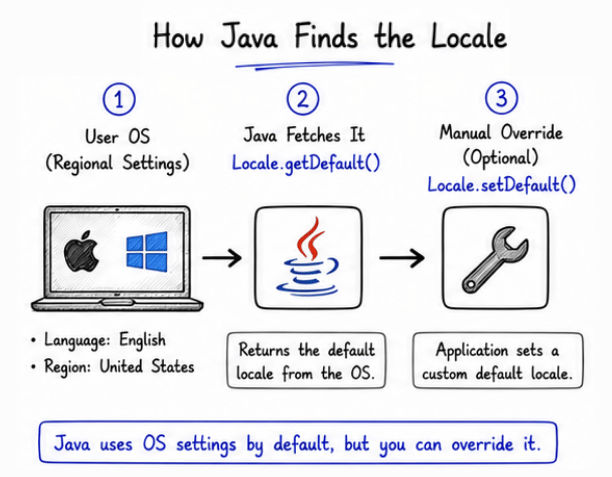
Java also allows developers to change the application's default locale using the Locale.setDefault() method.
This is useful when an application needs to use a specific language and regional setting globally.
Example
import java.util.Locale;

public class Test {

    public static void main(String[] args) {

        Locale.setDefault(new Locale("hi", "IN"));

        System.out.println(Locale.getDefault());
    }
}
Here:
"hi" represents the Hindi language
"IN" represents India
Locale.setDefault() changes the default locale of the application to Hindi (India).
Java applications can switch locales dynamically at runtime based on user preferences or regional settings.
This allows applications to provide content in different languages without restarting the application.
Example
import java.util.Locale;

public class Test {

    public static void main(String[] args) {

        Locale english = new Locale("en", "US");

        Locale hindi = new Locale("hi", "IN");

        System.out.println("English Locale: " + english);

        System.out.println("Hindi Locale: " + hindi);
    }
}
Applications like Amazon, Netflix, and Facebook dynamically switch language and regional settings based on user preferences and location.
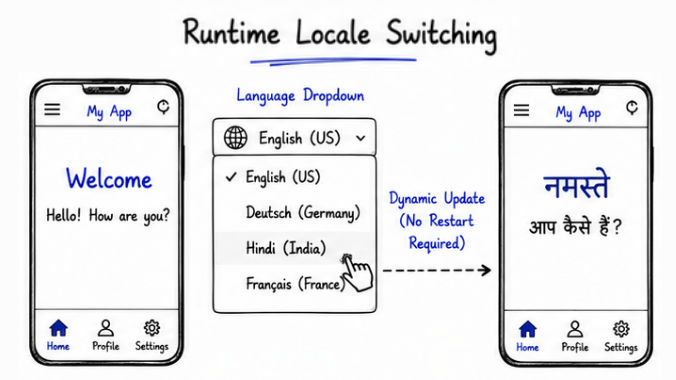
Locale changes how applications display data and content for users from different regions and languages.
Locale-Based Features
Date Formatting → Displays dates according to regional formats.
Currency Formatting → Shows currency symbols and values based on country settings.
Number Formatting → Formats numbers using regional decimal and grouping styles.
Language Translation → Displays application text in the user’s preferred language.
Time Formatting → Shows time in 12-hour or 24-hour format depending on locale settings.
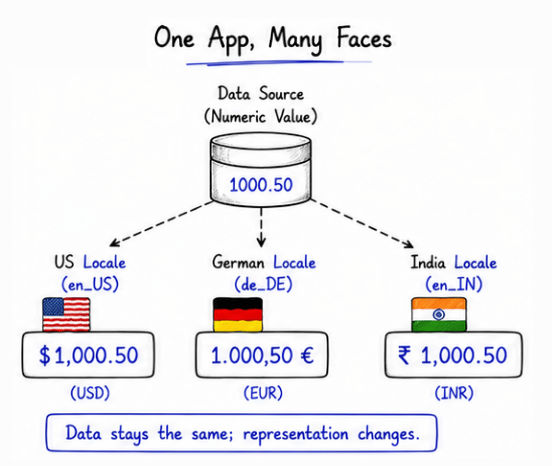
The NumberFormat class formats numbers according to a specific locale.
import java.text.NumberFormat;
import java.util.Locale;

public class Test {

    public static void main(String[] args) {

        double amount = 123456.78;

        NumberFormat nf =
                NumberFormat.getInstance(Locale.US);

        System.out.println(nf.format(amount));
    }
}
Output
123,456.78In the US locale:
Comma , is used as a thousands separator
Dot . is used as a decimal separator
The NumberFormat class can also format currency values based on locale settings.
import java.text.NumberFormat;
import java.util.Locale;

public class Test {

    public static void main(String[] args) {

        double amount = 5000;

        NumberFormat cf =
                NumberFormat.getCurrencyInstance(Locale.US);

        System.out.println(cf.format(amount));
    }
}
Output
$5,000.00Different locales display currencies differently based on regional currency symbols and formatting rules.
The DateFormat class formats dates according to locale-specific regional settings.
import java.text.DateFormat;
import java.util.Date;
import java.util.Locale;

public class Test {

    public static void main(String[] args) {

        Date date = new Date();

        DateFormat df =
                DateFormat.getDateInstance(
                        DateFormat.FULL,
                        Locale.US);

        System.out.println(df.format(date));
    }
}
The date format changes automatically according to the selected locale and regional settings.
Method | Purpose |
|---|---|
| Returns the default locale |
| Sets the default locale |
| Returns the language code |
| Returns the country code |
| Returns all supported locales |
Managing a large number of locales can become complex in big applications.
Translation and localization require additional development and maintenance effort.
Regional formatting differences may create consistency challenges.
Some languages may require special character and Unicode support.
UI layouts may break for languages with longer text content.
Locale in Java is an important class used for handling language and regional settings in applications. It plays a major role in internationalization (i18n) and localization (l10n).
Using Locale, developers can:
Build multilingual and globally accessible applications
Format dates, numbers, currencies, and time according to region
Provide region-specific user experience
Support different languages and cultural preferences
