
Author
Java applications need a proper setup to connect with databases. JDBC provides a standard way to establish this connection using drivers, database URLs, and credentials.
This guide explains environment setup, key interfaces, and the step-by-step connection process in a simple and practical way.
Database connectivity in JDBC means establishing a link between a Java application and a database so that SQL queries can be executed.
In simple words: It allows Java programs to communicate with databases like MySQL, Oracle, PostgreSQL, etc.
Example
Connection con = DriverManager.getConnection(
    "jdbc:mysql://localhost:3306/testdb",
    "root",
    "password"
);
? This line creates a connection between Java application and database.
Before writing JDBC code, you must properly set up the environment. Without the correct setup, Java cannot connect to any database.
Every database requires its own JDBC driver to establish a connection.
Examples:
mysql-connector-j.jarojdbc.jarpostgresql.jar? These JAR files contain the implementation of JDBC APIs that allow Java to communicate with databases.
How it is used in a project
In a Java project, you need to add the JAR file so JDBC can work properly.
In IDE (Eclipse / IntelliJ): Add as External Library / Dependency
In Command Line:
javac -cp mysql-connector-j.jar Test.java
java -cp mysql-connector-j.jar Test
? This shows how the JAR file is included in the project to enable database connectivity.
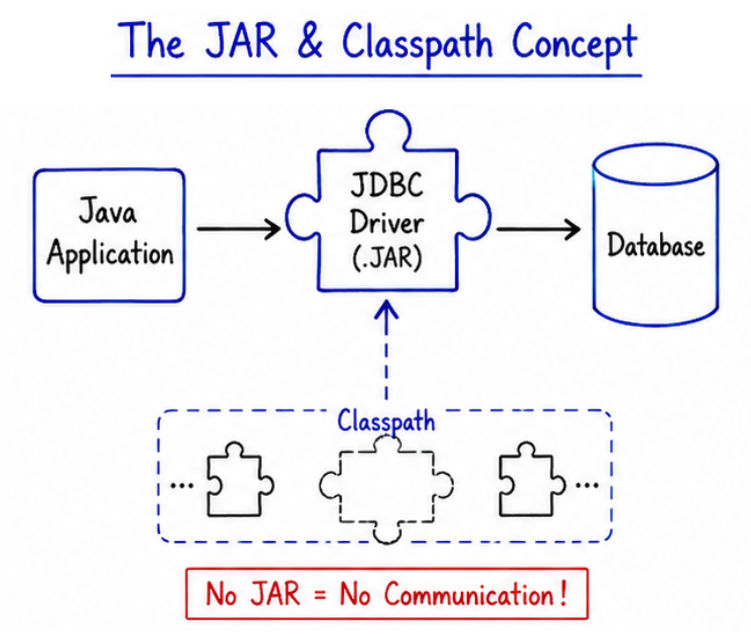
Java must know where the JDBC driver (JAR file) is located.
To make it work, we need to add the JAR file to the classpath.
Option 1: Using IDE (Eclipse / IntelliJ)
? This makes the driver available for the project automatically.
Option 2: Using Command Line
javac -cp .;mysql-connector-j.jar Test.java
java -cp .;mysql-connector-j.jar Test
? This tells Java where to find the JDBC driver during compilation and execution.
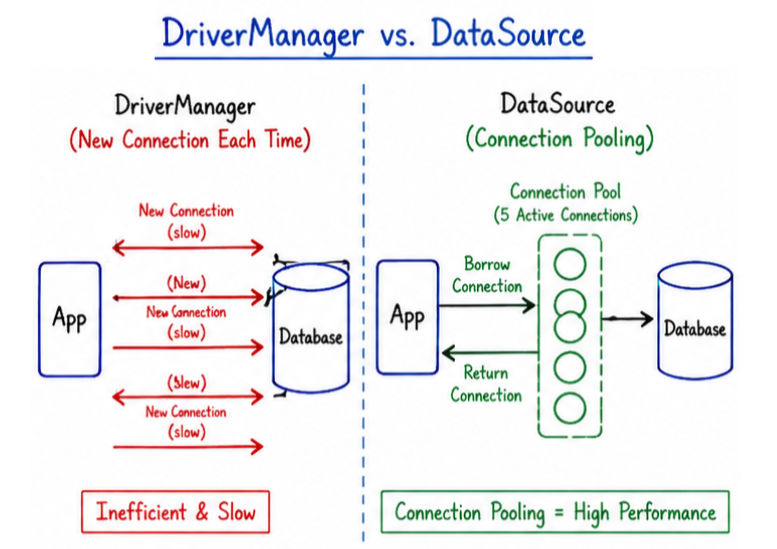
DriverManager is the traditional way to create connections in JDBC.
? It is used to establish a connection between Java application and database using URL, username, and password.
Key Points
Example
Connection con = DriverManager.getConnection(url, user, password);Limitations
? In modern applications, DriverManager is still used, but connection pooling (DataSource) is preferred for better performance and scalability.
DataSource is a modern and advanced way to create database connections in JDBC.
? It is mainly used in enterprise applications and frameworks like Spring because it provides better performance and connection management.
Key Points
DriverManagerAdvantages
Example
import javax.sql.DataSource;
import java.sql.Connection;

public class DataSourceExample {
    public static void main(String[] args) throws Exception {

        DataSource ds = getDataSource(); // assume configured DataSource

        Connection con = ds.getConnection();

        System.out.println("Connection created using DataSource");

        con.close();
    }

    public static DataSource getDataSource() {
        // configuration depends on framework/server
        return null;
    }
}
? In real-world applications, DataSource is preferred over DriverManager because it is more efficient, scalable, and production-ready.
| Feature | DriverManager | DataSource |
|---|---|---|
| Definition | Traditional way to create database connection | Modern way to manage database connections |
| Connection Creation | Creates a new connection every time | Uses connection pooling (reuses connections) |
| Performance | Slower in large applications | Faster due to reuse of connections |
| Scalability | Not suitable for large systems | Highly scalable |
| Connection Pooling | Not supported | Supported |
| Usage | Small applications, simple programs | Enterprise applications, Spring, Java EE |
| Management | Manually handled in code | Managed by application server or pool |
| Resource Usage | High (creates new connection each time) | Optimized and efficient |
The Connection interface is one of the most important parts of JDBC.
? It represents a live connection between a Java application and a database.
Statement, PreparedStatement)Example
Connection con = DriverManager.getConnection(url, user, password);
java.sql packageConnection objectTo connect to a database, we need proper connection details such as URL, username, and password.
The database URL defines the location and type of the database.
? It tells JDBC where the database is running and how to connect.
Format:
jdbc:subprotocol://host:port/database
Example (MySQL):
jdbc:mysql://localhost:3306/testdb
Here:
localhost → server location3306 → MySQL porttestdb → database name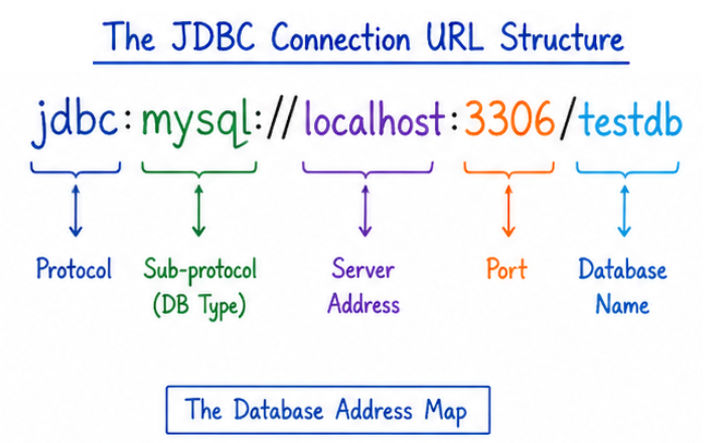
The username is used to log in to the database.
Example:
root
The password is used to authenticate the database user.
Example:
password123
Key Points
DriverManager.getConnection()? These three values are essential for establishing a successful JDBC database connection.
Now let’s understand the complete JDBC connection process step-by-step.
In this step, the JDBC driver is loaded into memory so Java can use it for database communication.
Class.forName("com.mysql.cj.jdbc.Driver");
? This registers the driver with DriverManager.
In this step, a connection is created between Java application and database.
Connection con = DriverManager.getConnection(
    "jdbc:mysql://localhost:3306/testdb",
    "root",
    "password"
);
? This establishes a live connection with the database.
After connection, you can configure important settings like:
Example:
con.setAutoCommit(true);
import java.sql.*;

public class DBConnection {
    public static void main(String[] args) throws Exception {

        // Step 1: Load Driver
        Class.forName("com.mysql.cj.jdbc.Driver");

        // Step 2: Create Connection
        Connection con = DriverManager.getConnection(
                "jdbc:mysql://localhost:3306/testdb",
                "root",
                "password"
        );

        System.out.println("Database Connected Successfully!");

        // Step 3: Close Connection
        con.close();
    }
}
Output
Database Connected Successfully!
JDBC connectivity is widely used in real-world Java applications, especially where data storage and retrieval are required.
Establishing database connectivity is the first and most important step in JDBC programming.
DriverManager and DataSource help in managing database connectionsConnection interface handles communication between Java and database? Once you understand JDBC connectivity, you can easily build real-world backend applications, APIs, and database-driven systems in Java.
