
Author
JDBC provides different types of statements to execute SQL queries and perform CRUD operations (Create, Read, Update, Delete). Understanding these is essential for building real-world Java backend applications.
JDBC statements are used to send SQL queries from a Java application to the database.
In simple words: They are tools that allow Java programs to execute SQL queries and interact with databases.
Example
Statement stmt = con.createStatement();
ResultSet rs = stmt.executeQuery("SELECT * FROM users");

while (rs.next()) {
    System.out.println(rs.getString("name"));
}
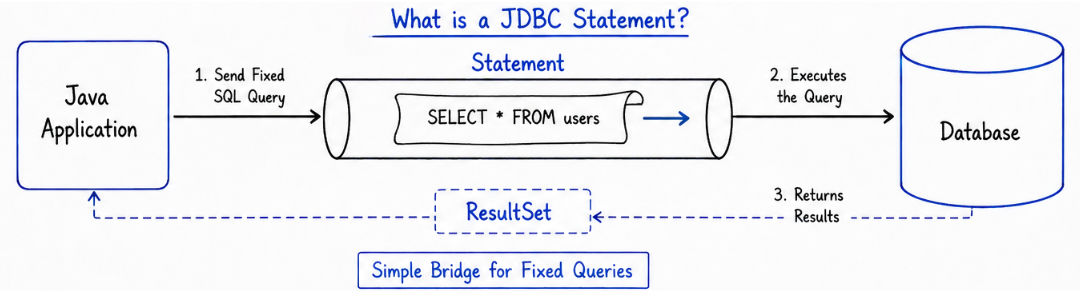
? Using JDBC statements, you can insert, fetch, update, and delete data from the database.
Java provides three main types of statements that are used to execute SQL queries in a database. Each type is used for different situations depending on security, performance, and requirements.

Statement is used for executing simple SQL queries without parameters.
? It is mainly used when the query is fixed and does not take input from the user.
Key Features
Example
Statement stmt = con.createStatement();

ResultSet rs = stmt.executeQuery("SELECT * FROM users");

while (rs.next()) {
    System.out.println(rs.getInt("id") + " " + rs.getString("name"));
}
Explanation
createStatement() → Creates a Statement objectexecuteQuery() → Executes SELECT queryResultSet → Stores data returned from databasers.next() → Moves to next rowPreparedStatement is used for executing SQL queries with parameters.
? It is mainly used when the query contains dynamic values (like user input).
Key Features
? placeholdersExample
PreparedStatement ps = con.prepareStatement(
    "SELECT * FROM users WHERE id = ?"
);

ps.setInt(1, 1);

ResultSet rs = ps.executeQuery();

while (rs.next()) {
    System.out.println(rs.getString("name"));
}
Explanation
prepareStatement() → Precompiles SQL query? → Placeholder for dynamic valuesetInt(1, 1) → Binds value to first parameterexecuteQuery() → Executes the queryResultSet → Stores returned data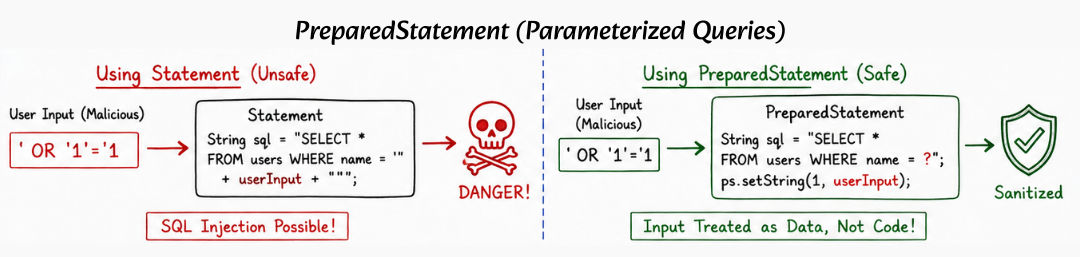
CallableStatement is used to call stored procedures in the database.
? It is mainly used when business logic is written inside the database as procedures or functions.
Key Features
Example
CallableStatement cs = con.prepareCall("{call getUser(?)}");

cs.setInt(1, 1);

ResultSet rs = cs.executeQuery();

while (rs.next()) {
    System.out.println(rs.getString("name"));
}
Explanation
prepareCall() → Prepares a stored procedure call{call getUser(?)} → Calls procedure with parametersetInt(1, 1) → Passes value to procedureexecuteQuery() → Executes procedureResultSet → Stores returned dataJDBC provides different methods to execute SQL queries depending on the type of operation (SELECT, INSERT, UPDATE, DELETE).
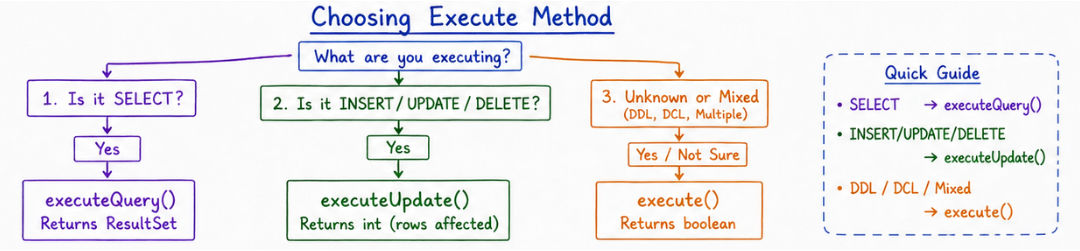
Used for executing SELECT queries that return data from the database.
ResultSet rs = stmt.executeQuery("SELECT * FROM users");

while (rs.next()) {
    System.out.println(rs.getString("name"));
}
? Returns a ResultSet object that contains the data retrieved from the database.
Used for executing INSERT, UPDATE, and DELETE queries.
int rows = stmt.executeUpdate(
    "UPDATE users SET name='Amit' WHERE id=1"
);

System.out.println("Rows affected: " + rows);
? Returns the number of rows affected by the query.
Used when you don’t know the type of SQL query (can be SELECT or UPDATE).
boolean result = stmt.execute("SELECT * FROM users");

if (result) {
    ResultSet rs = stmt.getResultSet();
    while (rs.next()) {
        System.out.println(rs.getString("name"));
    }
} else {
    int count = stmt.getUpdateCount();
    System.out.println("Rows affected: " + count);
}
? Returns:
true → if result is ResultSet (SELECT query)false → if result is update count (INSERT/UPDATE/DELETE)CRUD stands for Create, Read, Update, Delete.
These are the basic operations used to manage data in a database.
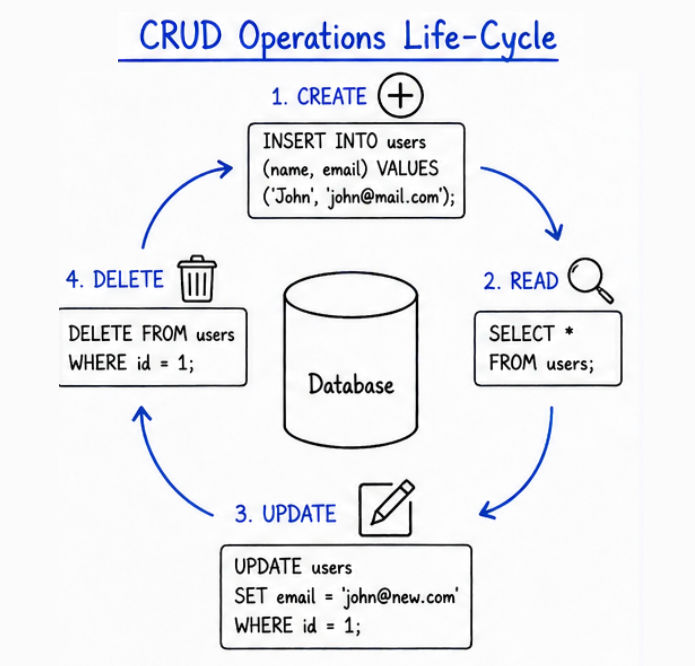
Used to insert new data into the database.
PreparedStatement ps = con.prepareStatement(
    "INSERT INTO users(name, age) VALUES (?, ?)"
);

ps.setString(1, "Amit");
ps.setInt(2, 25);

ps.executeUpdate();
? executeUpdate() inserts data and returns number of affected rows.
Used to retrieve data from the database.
PreparedStatement ps = con.prepareStatement(
    "SELECT * FROM users"
);

ResultSet rs = ps.executeQuery();

while (rs.next()) {
    System.out.println(rs.getString("name"));
}
? executeQuery() returns a ResultSet containing the data.
Used to modify existing data.
PreparedStatement ps = con.prepareStatement(
    "UPDATE users SET age=? WHERE name=?"
);

ps.setInt(1, 30);
ps.setString(2, "Amit");

ps.executeUpdate();
? Updates existing records based on condition.
Used to remove data from the database.
PreparedStatement ps = con.prepareStatement(
    "DELETE FROM users WHERE name=?"
);

ps.setString(1, "Amit");

ps.executeUpdate();
? Deletes records that match the given condition.
Parameter binding is used to pass values safely into SQL queries.
? It uses ? placeholders in the query, and actual values are set using methods like setInt(), setString(), etc.
Example
PreparedStatement ps = con.prepareStatement(
    "SELECT * FROM users WHERE id = ?"
);

ps.setInt(1, 10);

ResultSet rs = ps.executeQuery();

while (rs.next()) {
    System.out.println(rs.getString("name"));
}
Explanation
? → Placeholder for dynamic valuesetInt(1, 10) → Binds value 10 to first parameterPreparedStatement → Ensures values are handled safelyexecuteQuery() → Executes the queryBenefits
| Feature | Statement | PreparedStatement | CallableStatement |
|---|---|---|---|
| Query Type | Executes simple static SQL queries | Executes dynamic SQL queries with parameters | Calls stored procedures and functions |
| Parameters | Does not support parameters | Supports input parameters using ? |
Supports IN, OUT, and INOUT parameters |
| Security | Vulnerable to SQL Injection | Prevents SQL Injection using parameter binding | Secure when used properly |
| Performance | Slower (query compiled every time) | Faster (query precompiled and reused) | Moderate (depends on procedure execution) |
| Use Case | Simple and fixed queries | Most real-world applications | Enterprise-level database logic |
Statement for dynamic input (can lead to SQL Injection)PreparedStatement) for user inputConnection, Statement, and ResultSetJDBC statements are widely used in real-world applications where database operations are required.
JDBC statements are the core of database operations in Java and are used to execute all types of SQL queries.
