
Durgesh Tiwari
Author
Logging in Java is the process of recording application events, messages, warnings, errors, and execution details while a program is running. It helps developers monitor application behavior, trace problems, and debug applications efficiently.
In simple words: Logging helps developers understand what is happening inside an application during execution.
Java provides built-in logging support through:
java.util.logging
Third-party frameworks like Log4j and SLF4J
Logging is widely used in:
Backend applications
Enterprise systems
Banking software
APIs and web applications
Production monitoring systems
Logging is the practice of storing important application information in the form of messages while a program is running.
These log messages help developers monitor application activity and identify problems easily.
Logs may include:
Application start and shutdown details
User activities and operations
Errors and exceptions
Warning messages
Debugging and execution details
System and performance information
👉 Logs help developers analyze application behavior without stopping the program.
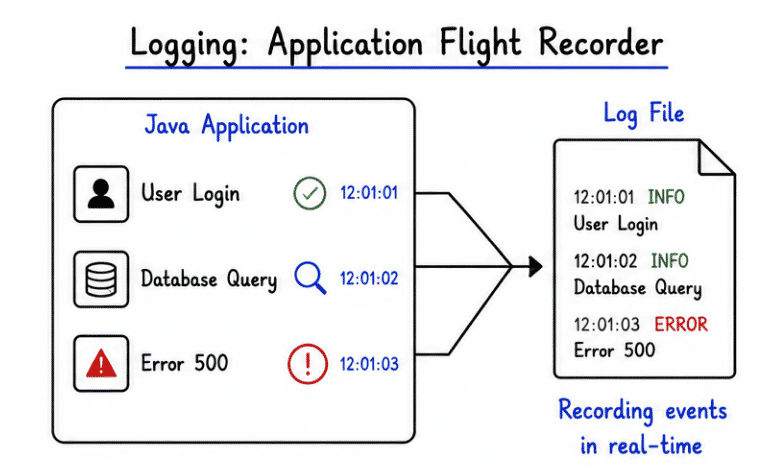
Logging is extremely important in real-world Java applications because it improves monitoring, debugging, troubleshooting, and maintenance.
Benefits of Logging
Helps identify errors quickly
Tracks application execution flow
Simplifies debugging and troubleshooting
Monitors production systems effectively
Improves application maintainability
Useful for auditing and security monitoring
Helps detect performance issues
👉 Without proper logging, debugging and maintaining large applications becomes very difficult.
Many beginners use System.out.println() for debugging, but professional applications use logging frameworks.
Feature | Logging Frameworks |
|
|---|---|---|
Purpose | Application monitoring, debugging, and tracking | Simple message printing |
Logging Levels | Supports levels like INFO, WARNING, ERROR, DEBUG | No logging levels |
Output Destination | Console, files, database, server logs | Console only |
Performance | Optimized for large applications | Less efficient in production |
Output Control | Can enable/disable logs easily | No control mechanism |
Formatting Support | Advanced structured formatting | Basic text output |
File Storage | Supports log file creation | Not supported |
Production Usage | Widely used in enterprise applications | Not recommended |
Debugging Support | Better debugging and issue tracing | Limited debugging support |
Maintenance | Easier application monitoring | Difficult in large systems |
👉 System.out.println() is useful for learning, but logging frameworks are used in real-world applications.
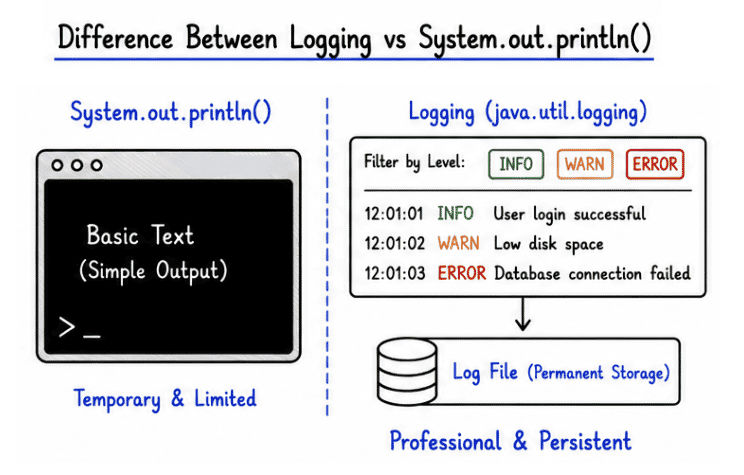
Logging is one of the most important features in enterprise and backend applications because it helps monitor, track, and analyze system activity.
It is widely used in:
User login and authentication tracking
Payment transaction monitoring
API request and response tracking
Error and exception monitoring in production
Security auditing and access tracking
Debugging backend services and microservices
Performance and server monitoring
Database query and operation tracking
Application health monitoring
Cloud and distributed systems management
Example of Real Logs
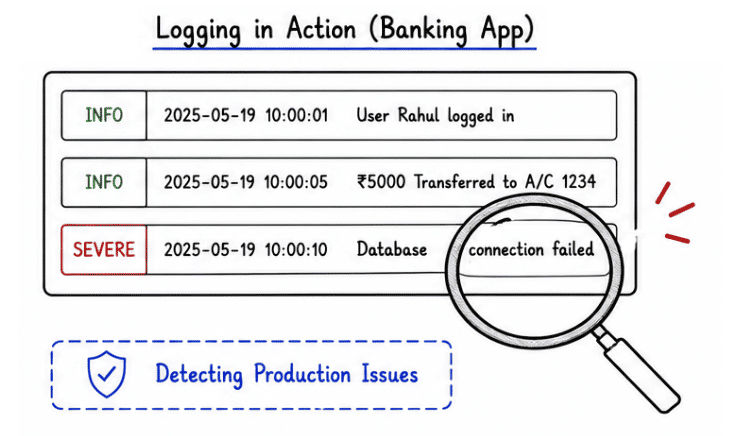
A banking application may generate logs like:
User Rahul logged in successfully

Transaction completed: ₹5000 transferred

Database connection failed
👉 These logs help developers and administrators monitor the system.
Different types of logs are used in Java applications for different monitoring and debugging purposes.
Application logs record normal application activities and important execution events during program execution.
These logs help developers and administrators understand how the application is working.
Common examples include:
Application started
User registered successfully
Data saved successfully
User logged out
Service initialized
Example
public class Test {
    public static void main(String[] args) {

        System.out.println("Application Started");
    }
}
👉 Application logs help monitor normal system behavior and track important application activities.
Error logs record application failures, exceptions, and critical problems that occur during program execution.
These logs help developers identify, analyze, and fix issues quickly.
Common examples include:
Database connection failure
File not found errors
NullPointerException
Server failures
API request failures
Example
public class Test {
    public static void main(String[] args) {

        System.out.println("Error: Database Connection Failed");
    }
}
👉 Error logs are very important for debugging, troubleshooting, and maintaining reliable Java applications.
Audit logs record important user activities and system events for security, tracking, and compliance purposes.
These logs help organizations monitor sensitive operations and maintain activity records.
Common examples include:
User login and logout
Password changes
Payment transactions
Account updates
Role and permission changes
Example
public class Test {
    public static void main(String[] args) {

        System.out.println("User Rahul changed password");
    }
}
👉 Audit logs are widely used in banking, enterprise, healthcare, and security-sensitive applications for monitoring user activities and maintaining compliance records.
Debug logs are used by developers to track application flow and troubleshoot problems during development and testing.
These logs provide detailed internal information about program execution.
Common examples include:
Variable values
Method execution flow
Internal processing details
Loop execution tracking
Function call information
Example
public class Test {
    public static void main(String[] args) {

        int x = 10;

        System.out.println("Debug: Value of x = " + x);
    }
}
👉 Debug logs are mostly used during development and testing to identify issues and understand application behavior internally.
public class Test {
    public static void main(String[] args) {

        System.out.println("Application Started");

        int result = 10 + 20;

        System.out.println("Result: " + result);

        System.out.println("Application Finished");
    }
}
Output
Application Started
Result: 30
Application Finished
👉 This example shows the simplest form of logging using System.out.println() to track application flow and execution steps.
Java provides a built-in logging API called java.util.logging for professional application logging and monitoring.
It helps developers create structured logs with different logging levels such as INFO, WARNING, and SEVERE.
Example
import java.util.logging.Logger;

public class Test {

    private static final Logger logger =
            Logger.getLogger(Test.class.getName());

    public static void main(String[] args) {

        logger.info("Application Started");

        int result = 10 + 20;

        logger.info("Result: " + result);

        logger.warning("This is a warning message");

        logger.severe("This is an error message");
    }
}
Output Example
INFO: Application Started
INFO: Result: 30
WARNING: This is a warning message
SEVERE: This is an error message
👉 java.util.logging provides a professional and structured way to handle logging in real-world Java applications.
Makes debugging easier and faster
Improves application monitoring and tracking
Helps identify issues in production environments
Supports security auditing and activity tracking
Maintains application history and execution records
Simplifies application maintenance and troubleshooting
Helps analyze errors and performance problems
Improves overall system reliability
Excessive logging may reduce application performance
Large log files can consume significant storage space
Poor logging practices may create unnecessary clutter
Sensitive information should never be logged
Too many debug logs can make troubleshooting difficult
Improper log management can affect system monitoring
Logging is an essential part of Java development that helps developers monitor application behavior, track activities, and identify errors efficiently.
It plays a major role in building reliable and maintainable real-world applications.
Improves debugging and troubleshooting
Helps monitor application execution and performance
Simplifies maintenance of large applications
Essential for backend, enterprise, and production systems
Provides better control and flexibility than System.out.println()
Supports structured and professional application monitoring
👉 Proper logging makes Java applications more reliable, maintainable, secure, and production-ready.
