
Author
Java 9 introduced a powerful feature called the Java Platform Module System (JPMS), also known as Project Jigsaw.
This update brought a major change in how Java applications are designed, organized, and managed. It helps developers write code that is more clean, secure, and scalable.
The Java Module System (JPMS) is a way to organize Java code into modules instead of only using packages.
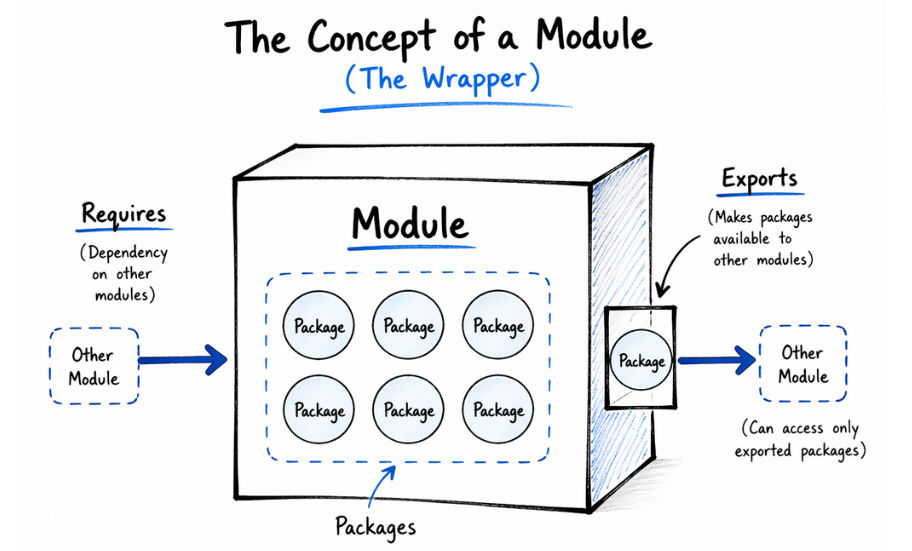
A module is a collection of related packages and resources grouped together with clearly defined dependencies.
? In simple words: A module works like a small independent unit (mini-application) inside a larger application. It gives you control over:
This makes your code more organized, secure, and easier to maintain.
Before Java 9, Java applications mainly used JAR files to manage code and dependencies.
However, this approach had several limitations:
Common Problems:
To solve these problems, Java 9 introduced the Java Platform Module System (JPMS).
JPMS helps improve how applications are structured and managed by:
The Java Module System is based on a few core concepts that help in organizing and managing applications efficiently.
A module in Java is defined using a special file called:
module-info.java
? This file is used to define:
The module-info.java file is the core of the Java Module System. It defines how a module works and interacts with other modules.
module com.example.myapp {
    requires java.sql;
    exports com.example.service;
}
Explanation:
module → defines the module namerequires → specifies dependencies (which modules are needed)exports → makes a package accessible to other modules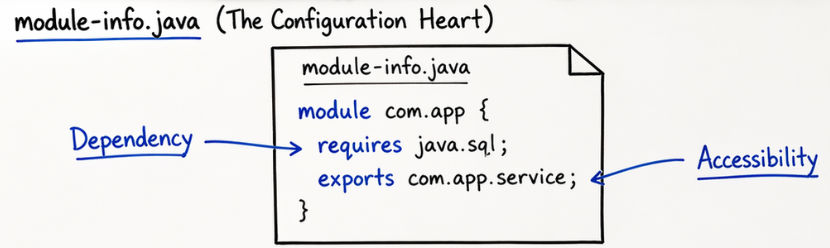
The requires keyword is used to declare a dependency on another module.
requires java.sql;
? This means the current module depends on the java.sql module.
The exports keyword is used to make a package accessible to other modules.
exports com.example.service;
? Only the exported packages are visible and accessible outside the module.
In the Java Platform Module System (JPMS), encapsulation is strongly enforced at the module level.
? This provides strong encapsulation at the JVM level, improving security and modular design.
MyApp/
 └── src/
     └── com.example.myapp/
         ├── module-info.java
         ├── com/example/service/
         │     └── UserService.java
         └── com/example/model/
               └── User.java
Explanation
module-info.java → defines the module configurationrequires → adds dependency on another moduleexports → makes selected packages available to other modulesmodel) stay hidden unless exportedBoth exports and opens are used to control access in Java modules, but they work differently.
exports com.example.service;
opens com.example.model;
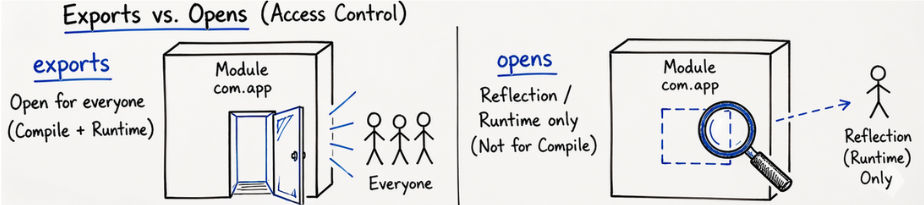
| Feature | exports | opens |
|---|---|---|
| Access | Compile-time + Runtime | Runtime only |
| Use Case | Normal access | Reflection-based access |
| Security | Strong encapsulation | Less strict access |
Java 9 (JPMS) supports three types of modules: Named Modules, Unnamed Modules, and Automatic Modules.
Named modules are the modules that are explicitly defined by the developer using a module-info.java file.
Example of Named Module
module-info.java
module com.example.myapp {
    requires java.sql;
    exports com.example.service;
}
Unnamed modules are traditional Java programs that run using the classpath, without using the module system.
module-info.java? Basically, these are legacy Java applications.
Example
java -cp MyApp.jar com.example.Main
Automatic modules are created when you place existing JAR files into the module path.
module-info.java is requiredExample
java --module-path libs --module com.example.myapp/com.example.Main
? Suppose you add:
libs/guava-32.0.jar
Then Java automatically treats it as a module, even without module-info.java.
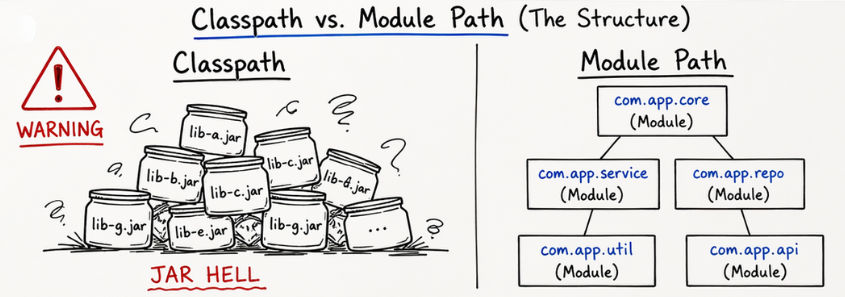
Both classpath and module path are used to locate and load Java classes, but they work in very different ways.
| Feature | Classpath (Traditional Approach) | Module Path (JPMS - Java 9+) |
|---|---|---|
| Structure | Flat structure (no grouping of code) | Modular structure (code is divided into modules) |
| Encapsulation | No strong encapsulation | Strong encapsulation (hides internal code) |
| Dependency Handling | Implicit (not clearly defined) | Explicit (defined using requires) |
| Security | Low (everything is accessible) | High (controlled access between modules) |
| Maintainability | Difficult in large applications | Easy to manage and scale |
| Configuration | Simple but less control | More structured and strict |
This is a basic example showing how a module is created, how a class is defined inside it, and how it is used in another module.
Step 1: Create Module
In this step, we define a module using module-info.java and specify what packages it will expose to other modules.
module com.app.calculator {
    exports com.app.calc;
}
Step 2: Create Class
In this step, we create a Java class inside the exported package. This class contains the actual business logic.
package com.app.calc;

public class Add {

    public int sum(int a, int b) {
        return a + b;
    }
}
Step 3: Use in Another Module
In this step, another module uses the calculator module by declaring it as a dependency using requires.
module com.app.main {
    requires com.app.calculator;
}
The ServiceLoader API in Java modules is used to achieve loose coupling between modules. It helps one module use a service without knowing its exact implementation.
Example: Using Service
module com.app.user {
    uses com.app.service.PaymentService;
}
PaymentService)Example: Providing Service
module com.app.provider {
    provides com.app.service.PaymentService
    with com.app.impl.UPIPayment;
}
UPIPayment is the actual implementation classIn JPMS, reflection access is restricted by default to improve security and encapsulation.
This means classes inside a module cannot be accessed freely using reflection unless explicitly allowed.
Allowing Reflection Access
To allow reflection, we use the opens keyword.
opens com.example.model;
This allows runtime (reflection) access to the package
Opening to Specific Module
We can also open a package to a specific module only:
opens com.example.model to spring.core;
This allows reflection access only for the specified module
module-info.java, and dependencies takes timeThese are the most important keywords used in the Java Module System (JPMS) and their purposes.
| Keyword | Purpose |
|---|---|
| module | Used to define a module |
| requires | Adds a dependency on another module |
| exports | Makes a package accessible |
| opens | Allows reflection access |
| uses | Declares service usage |
| provides | Defines service implementation |
The Java Platform Module System (JPMS) is mainly used in large and complex applications where better structure and dependency management are needed.
Java Modules (JPMS) are most useful when your application needs better structure and dependency management.
In some cases, using JPMS may add unnecessary complexity.
The Java Module System (JPMS) is a powerful feature introduced in Java 9 that brings better structure, security, and scalability to Java applications.
It helps developers build applications in a more organized and controlled way.
? While JPMS may not be required for small projects, it is very important for modern enterprise-level Java applications where scalability and maintainability matter.
