Author
Shadows in CSS are a powerful way to make your text and elements look more engaging. By adding shadows, you can give your website a sense of depth, make important content stand out, and even create glowing effects that grab attention.
CSS provides two main properties to create shadow effects:
text-shadow → for adding shadows to text.box-shadow → for adding shadows to boxes, divs, buttons, and other elements.Let’s go step by step with examples and explanations.
The text-shadow property allows you to add shadows behind your text. It accepts values in the following format:
text-shadow: horizontal vertical blur color;
h1 {
  text-shadow: 2px 2px;
}You can use the text-shadow property to add shadows in any color, making your text more stylish and noticeable.
h1 {
  text-shadow: 2px 2px red;
}
The text-shadow property lets you blur shadows by adding a blur radius, giving your text a softer and more glowing appearance.
h1 {
  text-shadow: 2px 2px 5px red;
}
This is great for making light text visible on colorful backgrounds.
h1 {
  color: white;
  text-shadow: 2px 2px 4px #000000;
}
You can simulate a glowing text effect by using a blur with a bright color.
h1 {
  text-shadow: 0 0 3px #FF0000;
}
CSS allows you to add multiple shadows to the same text by separating them with commas. This creates richer visual effects.
You can combine multiple shadows with different colors using text-shadow to create a glowing effect, like red and blue neon around your text.
h1 {
  text-shadow: 0 0 3px #FF0000, 0 0 5px #0000FF;
}
By applying multiple shadows in different colors and positions, you can create depth and a glowing effect around white text.
h1 {
  color: white;
  text-shadow: 1px 1px 2px black,
               0 0 25px blue,
               0 0 5px darkblue;
}
Instead of using stroke (not supported in all browsers), you can fake a border around text with shadows:
h1 {
  color: coral;
  text-shadow: -1px 0 black,
               0 1px black,
               1px 0 black,
               0 -1px black;
}
While text-shadow only works on text, box-shadow lets you add shadows to any element (buttons, cards, containers).
div {
  width: 200px;
  height: 100px;
  background: lightblue;
  box-shadow: 5px 5px;
}
The box-shadow property lets you add a shadow with blur and color to any element, creating a soft, realistic, and visually appealing depth effect.
div {
  box-shadow: 5px 5px 15px rgba(0,0,0,0.5);
}
You can add several shadows to an element by separating them with commas, creating layered or glowing effects for more striking designs.
div {
  box-shadow: 0 0 10px red, 0 0 20px blue;
}<!DOCTYPE html>
<html lang="en">
<head>
<meta charset="UTF-8">
<meta name="viewport" content="width=device-width, initial-scale=1.0">
<title>CSS Text Shadows - Part 1</title>
<style>
body {
background-color: #1e1e1e;
color: white;
font-family: Arial, sans-serif;
padding: 20px;
line-height: 2;
}
h2 {
margin-top: 50px;
font-size: 36px;
text-align: center;
}
/* 1. CSS Text Shadow */
.text-shadow-basic {
text-shadow: 2px 2px;
}
/* 2. Adding Shadow with Color */
.text-shadow-color {
text-shadow: 2px 2px red;
}
/* 3. Adding Blur Effect */
.text-shadow-blur {
text-shadow: 2px 2px 5px green;
}
/* 4. White Text with Black Shadow */
.text-shadow-white-black {
color: white;
text-shadow: 2px 2px 4px black;
}
/* 5. Neon Glow Effect */
.text-shadow-neon {
color: #0ff;
text-shadow: 0 0 5px #0ff, 0 0 10px #0ff, 0 0 20px #0ff, 0 0 40px #0ff;
}
/* 6. Red + Blue Glow */
.text-shadow-red-blue {
text-shadow: 0 0 3px red, 0 0 5px blue;
}
/* 7. White Text with Layered Shadows */
.text-shadow-layered {
color: white;
text-shadow: 1px 1px 2px black, 0 0 25px blue, 0 0 5px darkblue;
}
/* 8. Border-Like Effect with Shadows */
.text-shadow-border {
color: coral;
text-shadow: -1px 0 black, 0 1px black, 1px 0 black, 0 -1px black;
}
</style>
</head>
<body>
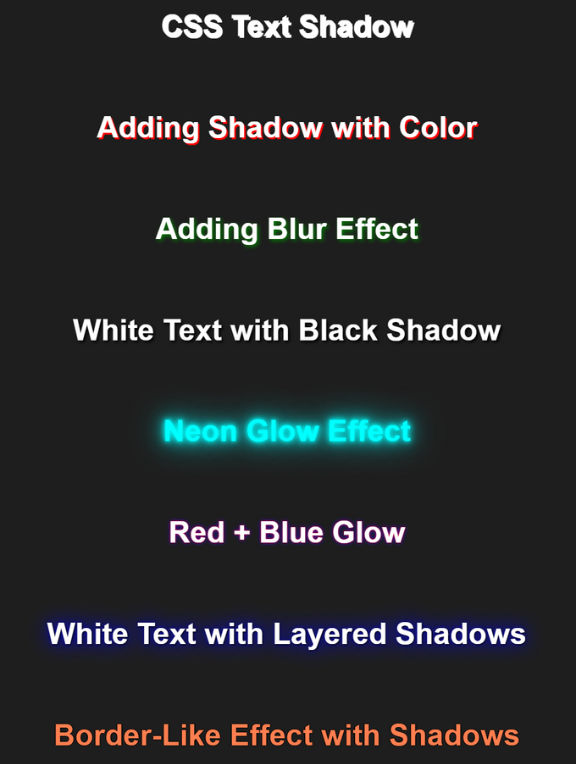
<h2 class="text-shadow-basic">CSS Text Shadow</h2>
<h2 class="text-shadow-color">Adding Shadow with Color</h2>
<h2 class="text-shadow-blur">Adding Blur Effect</h2>
<h2 class="text-shadow-white-black">White Text with Black Shadow</h2>
<h2 class="text-shadow-neon">Neon Glow Effect</h2>
<h2 class="text-shadow-red-blue">Red + Blue Glow</h2>
<h2 class="text-shadow-layered">White Text with Layered Shadows</h2>
<h2 class="text-shadow-border">Border-Like Effect with Shadows</h2>
</body>
</html>Output :
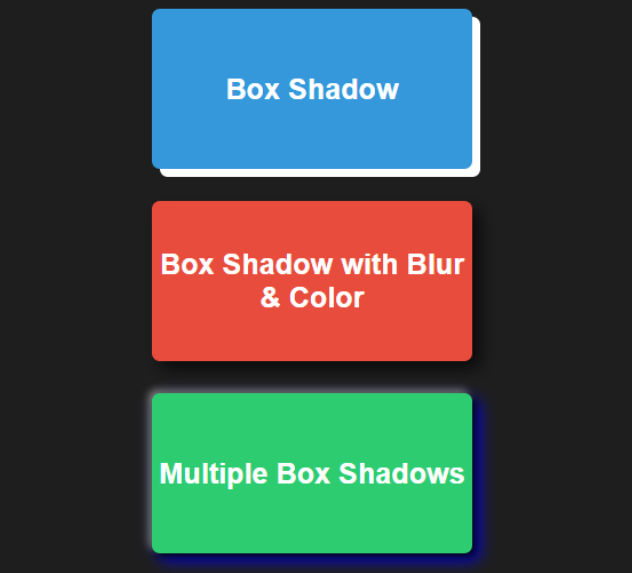
<!DOCTYPE html>
<html lang="en">
<head>
<meta charset="UTF-8">
<meta name="viewport" content="width=device-width, initial-scale=1.0">
<title>CSS Box Shadows - Part 2</title>
<style>
  body {
    background-color: #1e1e1e;
    color: white;
    font-family: Arial, sans-serif;
    padding: 20px;
    text-align: center;
  }

  .box {
    width: 200px;
    height: 100px;
    margin: 20px auto;
    display: flex;
    align-items: center;
    justify-content: center;
    color: white;
    font-weight: bold;
    font-size: 18px;
    border-radius: 5px;
  }

  /* 9. CSS Box Shadow */
  .box-shadow-basic {
    background-color: #3498db;
    box-shadow: 5px 5px;
  }

  /* 10. Box Shadow with Blur and Color */
  .box-shadow-blur-color {
    background-color: #e74c3c;
    box-shadow: 5px 5px 10px rgba(0,0,0,0.7);
  }

  /* 11. Multiple Box Shadows */
  .box-shadow-multiple {
    background-color: #2ecc71;
    box-shadow: 2px 2px 5px black, -2px -2px 5px gray, 4px 4px 10px blue;
  }
</style>
</head>
<body>

<div class="box box-shadow-basic">Box Shadow</div>
<div class="box box-shadow-blur-color">Box Shadow with Blur & Color</div>
<div class="box box-shadow-multiple">Multiple Box Shadows</div>

</body>
</html>
Output :