
Author
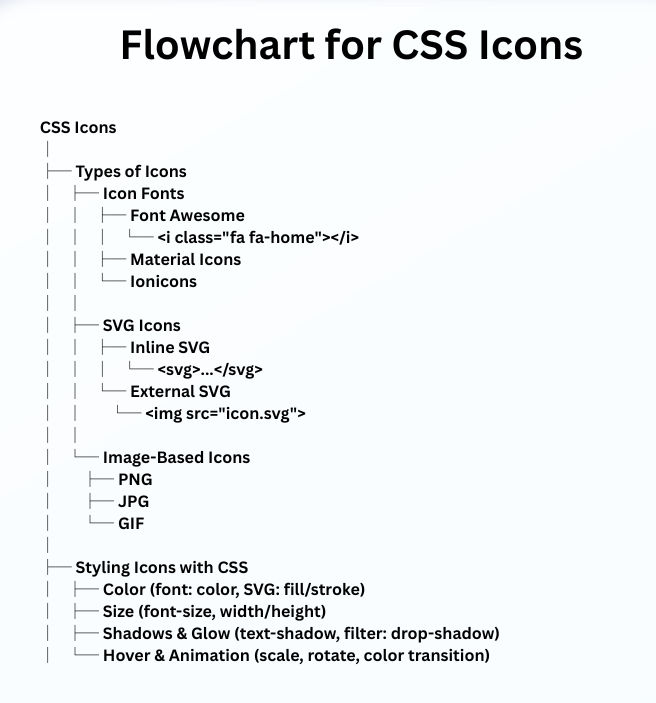
CSS icons are symbols used in websites for navigation, actions, or decoration. Instead of using image files, CSS allows icons to be scalable, lightweight, and easily stylable.
Icon fonts are fonts that contain symbols instead of letters. Popular icon fonts include:
Example:
<i class="fa fa-home"></i>
.fa-home {
  font-size: 30px;
  color: #FF5733;
}
SVG (Scalable Vector Graphics) icons are vector images that remain sharp at any size. They can be embedded inline or used as external files.
Advantages:
transform, fill, stroke)Example:
<svg width="40" height="40" viewBox="0 0 24 24" fill="none" stroke="black" stroke-width="2">
  <path d="M3 12l9-9 9 9M4 10v10h16V10"/>
</svg>
svg:hover {
  stroke: #FF0000;
  transform: scale(1.2);
}
These are traditional icons using PNG, GIF, or JPG images. Less common now but still useful for very detailed or complex icons.
Basic Example:
<link rel="stylesheet" href="<https://cdnjs.cloudflare.com/ajax/libs/font-awesome/6.0.0/css/all.min.css>">
<i class="fa fa-user"></i>
.fa-user {
  font-size: 40px;
  color: #3498db;
  transition: transform 0.3s;
}
.fa-user:hover {
  transform: scale(1.2);
  color: #e74c3c;
}
<img> or background-image; limited styling.svg {
width: 50px;
height: 50px;
transition: transform 0.3s, fill 0.3s;
}
svg:hover {
transform: rotate(15deg);
fill: #ff6347;
}
CSS provides many ways to style icons:
color for icon fonts, fill/stroke for SVGfont-size for fonts, width/height for SVGtext-shadow or filter: drop-shadow()Example:
.icon {
  font-size: 35px;
  color: #2ecc71;
  transition: transform 0.3s, color 0.3s;
}
.icon:hover {
  transform: scale(1.3);
  color: #27ae60;
}
aria-label or title for screen readersExample:
<i class="fa fa-bell" aria-label="Notifications"></i>
Example: Neon Glow
.fa-star {
  color: yellow;
  text-shadow: 0 0 5px #ff0, 0 0 10px #ff0;
}
<!DOCTYPE html>
<html lang="en">
<head>
<meta charset="UTF-8">
<meta name="viewport" content="width=device-width, initial-scale=1.0">
<title>CSS Icon Examples</title>
<!-- Font Awesome CDN -->
<link rel="stylesheet" href="https://cdnjs.cloudflare.com/ajax/libs/font-awesome/6.4.0/css/all.min.css">
<style>
  body {
    background-color: #1e1e1e;
    color: white;
    font-family: Arial, sans-serif;
    text-align: center;
    padding: 50px;
  }

  .example {
    margin: 20px;
    display: inline-block;
  }

  /* 1. Basic Font Awesome Icon */
  .fa-home {
    font-size: 30px;
    color: #FF5733;
  }

  /* 2. Font Awesome Hover Scale */
  .fa-user {
    font-size: 40px;
    color: #3498db;
    transition: transform 0.3s, color 0.3s;
  }
  .fa-user:hover {
    transform: scale(1.2);
    color: #e74c3c;
  }

  /* 3. Inline SVG Hover */
  svg {
    width: 40px;
    height: 40px;
    transition: transform 0.3s, stroke 0.3s;
  }
  svg:hover {
    transform: scale(1.2);
    stroke: #FF0000;
  }

  /* 4. Neon Glow Font Awesome */
  .fa-star {
    font-size: 50px;
    color: yellow;
    text-shadow: 0 0 5px #ff0, 0 0 10px #ff0;
  }

  /* 5. Interactive Icon (Color + Scale) */
  .fa-bell.icon {
    font-size: 35px;
    color: #2ecc71;
    transition: transform 0.3s, color 0.3s;
  }
  .fa-bell.icon:hover {
    transform: scale(1.3);
    color: #27ae60;
  }
</style>
</head>
<body>

<h1>CSS Icon Examples</h1>

<div class="example">
  <i class="fa fa-home"></i>
  <p>Basic Icon</p>
</div>

<div class="example">
  <i class="fa fa-user"></i>
  <p>Hover Scale</p>
</div>

<div class="example">
  <svg viewBox="0 0 24 24" fill="none" stroke="black" stroke-width="2">
    <path d="M3 12l9-9 9 9M4 10v10h16V10"/>
  </svg>
  <p>SVG Icon</p>
</div>

<div class="example">
  <i class="fa fa-star"></i>
  <p>Neon Glow</p>
</div>

<div class="example">
  <i class="fa fa-bell icon" aria-label="Notifications"></i>
  <p>Interactive Icon</p>
</div>

</body>
</html>
Output :

