
Durgesh Tiwari
Author
Large Language Models (LLMs) can understand and generate text, but they cannot perform tasks such as accessing real-time data, searching the web, reading files, querying databases, or interacting with external applications on their own.
Tool Calling enables an LLM to use external tools and services to retrieve information or perform actions beyond its built-in knowledge.
For example, Tool Calling allows an AI model to:
Check today's weather
Search the latest news
Read documents
Query databases
Book meetings
Call APIs
By connecting with external systems, LLMs can provide real-time information and automate tasks.
Modern AI assistants such as ChatGPT, Microsoft Copilot, Google Gemini, and Claude use Tool Calling to build more powerful and interactive AI applications.
In this chapter, you'll learn what Tool Calling is, how it works, its components, common use cases, and its benefits.
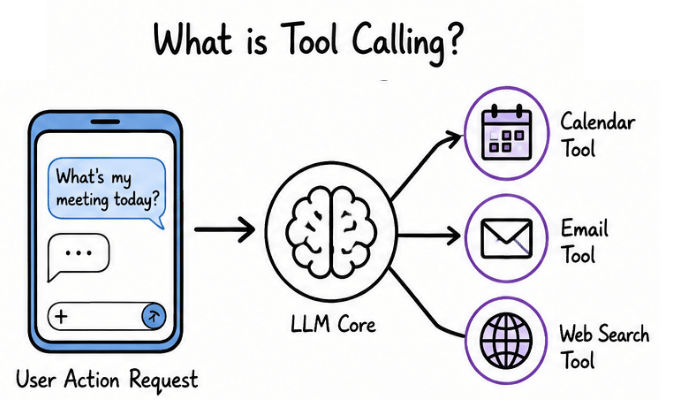
Tool Calling allows an LLM to use external tools such as APIs, databases, search engines, and files to retrieve information or perform tasks.
Instead of relying only on its training data, the LLM can use these tools to complete user requests.
"Summarize the latest AI news and email it to me."
The AI:
Searches the latest AI news.
Summarizes the results.
Sends the summary by email.
User Request
      │
      ▼
LLM (Large Language Models)
      │
      ▼
Uses Required Tools
      │
      ▼
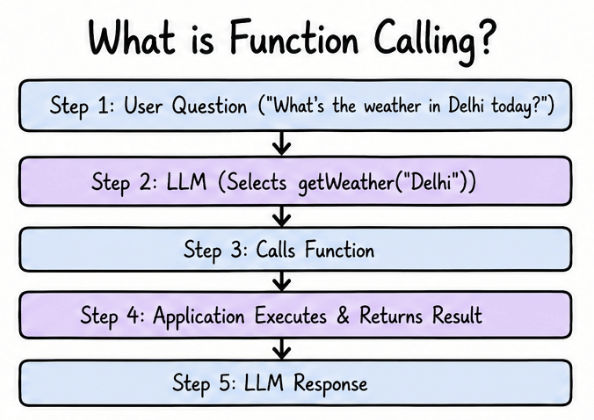
Final ResponseFunction Calling is a type of Tool Calling that allows an LLM to call a predefined function provided by an application.
The LLM selects the required function and passes the necessary inputs, while the application executes the function and returns the result.
getWeather(city)If a user asks:
"What's the weather in Delhi today?"
The LLM calls:
getWeather("Delhi")User Question
│
▼
LLM
│
▼
Calls Function
│
▼
Application Executes
│
▼
Returns Result
│
▼
LLM ResponseNote: The LLM only decides which function to call and what inputs to pass. The application executes the function.
LLMs generate responses based on their training data, but they cannot access real-time information or interact with external systems on their own.
For example, they cannot:
Check live weather
Get current stock or cryptocurrency prices
Book flights or appointments
Query databases
Tool Calling solves this problem by allowing an LLM to use external tools such as APIs, databases, search engines, and file systems.
Accesses real-time information
Retrieves data from APIs and databases
Reads and analyzes documents
Performs calculations
Automates tasks such as sending emails or booking appointments
"Book the cheapest flight from Delhi to Mumbai for tomorrow."
The LLM uses a flight booking API to search available flights, compare prices, and complete the booking.
Without Tool Calling, an LLM can only generate text. With Tool Calling, it can also perform real-world tasks.
Function Calling is a type of Tool Calling, but they are not the same.
Function Calling | Tool Calling |
|---|---|
Calls predefined functions | Uses different types of external tools |
Performs a specific task | Can combine multiple tools |
Uses developer-defined functions | Works with APIs, databases, search, files, and more |
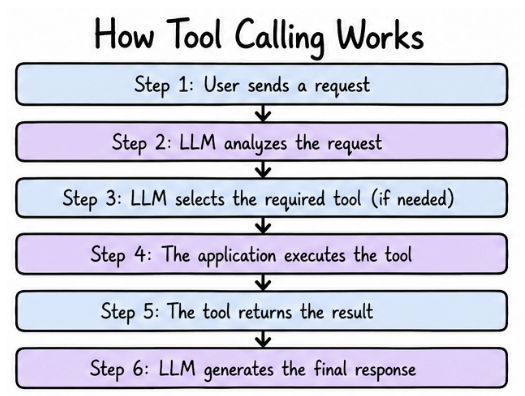
When a user sends a request, the LLM decides whether it can answer directly or needs an external tool. If a tool is required, the application executes it and returns the result to the LLM, which then generates the final response.
User sends a request.
LLM analyzes the request.
LLM selects the required tool (if needed).
The application executes the tool.
The tool returns the result.
LLM generates the final response.
User Request
      │
      ▼
      LLM
      │
      ▼
Tool Required?
   │        │
 No        Yes
 │          │
 ▼          ▼
Answer   Execute Tool
            │
            ▼
     Receive Result
            │
            ▼
Final Response"What is the current weather in Mumbai?"
The LLM selects the weather tool.
The application calls the weather API.
The API returns the latest weather data.
The LLM generates the final response.
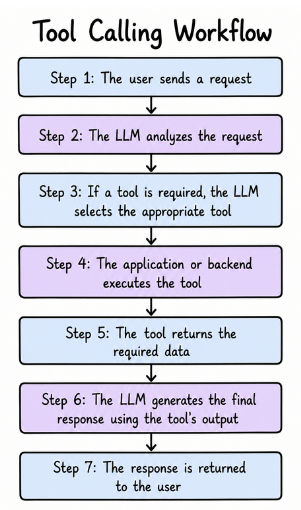
The following diagram shows the overall workflow of Tool Calling.
User
  │
  ▼
User Request
  │
  ▼
Large Language Model (LLM)
  │
  ▼
Select Appropriate Tool
  │
  ▼
Application / Backend
  │
  ▼
External Tool
(API / Database / Search / File)
  │
  ▼
Return Result
  │
  ▼
LLM Generates Response
  │
  ▼
User
here,
The user sends a request.
The LLM analyzes the request.
If a tool is required, the LLM selects the appropriate tool.
The application or backend executes the tool.
The tool returns the required data.
The LLM generates the final response using the tool's output.
The response is returned to the user.
AI applications can integrate with different types of external tools depending on the task they need to perform. These integrations enable LLMs to retrieve live information, access business data, search content, and process user-provided files.
The most common types of tool integration are:
API Integration
Database Integration
Search Integration
File & Document Integration
Let's understand each of them.
API Integration allows an LLM to communicate with external services through APIs (Application Programming Interfaces) to retrieve real-time information or perform actions.
Common uses include:
Weather updates
Flight or hotel booking
Sending emails
Online payments
Order tracking
Live stock prices
Example
"What's the weather in New York today?"
The application calls a weather API, retrieves the latest weather data, and the LLM generates a natural response.
Database Integration allows an LLM to access information stored in business databases through the application's backend.
This enables AI applications to answer questions using private and up-to-date business data.
Example
"What is the status of my order?"
The application queries the database, retrieves the order details, and the LLM generates the response.
Common use cases:
Customer support
CRM systems
Banking applications
Healthcare systems
E-commerce platforms
Enterprise software
Search Integration allows an LLM to search the web, internal documents, or enterprise knowledge bases to retrieve the latest information before generating a response.
Example
"What are today's top AI news headlines?"
The AI searches trusted sources, retrieves the latest news, and summarizes the results.
Common use cases:
AI search engines
Research assistants
News summarization
Enterprise knowledge search
Customer support bots
File & Document Integration allows an LLM to read and process files such as PDFs, Word documents, Excel sheets, presentations, and text files.
It can:
Summarize documents
Answer questions from files
Extract key information
Compare documents
Analyze reports
Generate content from uploaded files
Example
"Summarize this report in five points."
The AI reads the uploaded PDF and generates a concise summary.
Similarly, if a user asks:
"Which product had the highest sales?"
The AI analyzes the uploaded Excel file and returns the answer.
Common use cases:
AI document assistants
Legal document analysis
Financial report analysis
Resume screening
Research assistants
Enterprise knowledge systems
Tool Calling is widely used in many AI applications, including:
AI Chatbots – Answer customer queries using live information.
Virtual Assistants – Schedule meetings, send emails, and manage calendars.
Customer Support – Retrieve customer records and order details.
AI Search Engines – Search the web and summarize information.
Enterprise AI – Access internal documents and business data.
Healthcare Systems – Retrieve patient and medical information.
Finance Applications – Access account details and market data.
Travel Assistants – Search and book flights or hotels.
Follow these best practices when building AI applications with Tool Calling:
Use the Right Tool: Choose the most suitable tool for each task.
Validate User Input: Verify user input before sending it to APIs or databases.
Handle Errors: Gracefully handle API failures, invalid requests, and network issues.
Protect Sensitive Data: Store API keys and confidential information securely.
Limit Tool Access: Give the AI access only to the tools it requires.
Keep Responses User-Friendly: Convert technical tool outputs into clear and natural language.
Tool Calling extends the capabilities of Large Language Models (LLMs) by enabling them to interact with external tools and services. Instead of relying only on their training data, LLMs can retrieve real-time information, access databases, search the web, process documents, and perform actions through APIs.
In this chapter, you learned the concepts of Tool Calling and Function Calling, how they differ, how the Tool Calling workflow operates, and the different types of tool integrations, including API, Database, Search, and File & Document Integration.
By combining LLMs with external tools, Tool Calling enables AI applications to deliver more accurate, dynamic, and action-oriented solutions, making it a key technology for building modern AI assistants and enterprise applications.
