Author
<thead>, <tbody>, <tfoot>)When a table becomes large and complex, it is a good practice to divide it into three sections. This makes the table more organized, accessible, and SEO-friendly.
<thead> – Table Head<th> (table header cells).Example:
<table border="1">
  <thead>
    <tr>
      <th>Product</th>
      <th>Price</th>
      <th>Quantity</th>
    </tr>
  </thead>
</table>
Output :

<tbody> – Table Body<tr>) with data cells (<td>).<tbody> is not written, browsers automatically treat all rows as part of the body.Example:
<table border="1">
  <tbody>
    <tr>
      <td>Laptop</td>
      <td>$800</td>
      <td>10</td>
    </tr>
    <tr>
      <td>Phone</td>
      <td>$500</td>
      <td>20</td>
    </tr>
  </tbody>
</table>
Output :

<tfoot> – Table Footer<tbody> in HTML code but may be displayed at the bottom of the table.Example:
<table border="1">
  <tfoot>
    <tr>
      <td colspan="2">Total Quantity</td>
      <td>30</td>
    </tr>
  </tfoot>
</table>
Output :

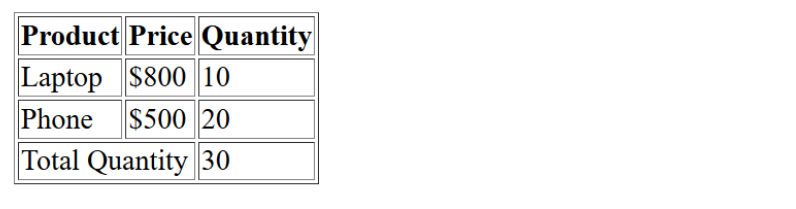
Complete Example with <thead>,<tbody>,<tfoot> :
<table border="1">
  <thead>
    <tr>
      <th>Product</th>
      <th>Price</th>
      <th>Quantity</th>
    </tr>
  </thead>
  <tbody>
    <tr>
      <td>Laptop</td>
      <td>$800</td>
      <td>10</td>
    </tr>
    <tr>
      <td>Phone</td>
      <td>$500</td>
      <td>20</td>
    </tr>
  </tbody>
  <tfoot>
    <tr>
      <td colspan="2">Total Quantity</td>
      <td>30</td>
    </tr>
  </tfoot>
</table>
Output :