Author
An HTML table is a way to organize and display data in a structured format using rows and columns. Tables are created with the <table> tag and are commonly used to present information such as student reports, schedules, product details, and price lists.
HTML tables are mainly used to organize and present data in a structured way. A table arranges information in rows and columns, which makes it easier to read, compare, and analyze.
The primary purpose of tables is to show data that naturally fits into a grid format.
Example: Student marksheet, product price list, schedules.
Tables allow users to compare values side by side.
Example: Comparing features of different mobile phones or laptops.
Tables make these easy to read.
Screen readers and assistive technologies can read tables row by row, which makes structured data more accessible to visually impaired users when used correctly with <th> and captions.
In the early days of web design (before CSS became popular), tables were often misused for page layouts.
Example: Websites used to arrange menus, sidebars, and content using tables.
The <table> tag is the main container. Inside it, rows are defined with <tr> and columns with <td> (for data) or <th> (for headings).
Syntax :
<table>
  <tr>
    <th>Heading 1</th>
    <th>Heading 2</th>
  </tr>
  <tr>
    <td>Data 1</td>
    <td>Data 2</td>
  </tr>
</table>
Output :

Tables are made up of rows and columns. In HTML, three important tags are used inside a table:
<tr> – Table Row<td> (data cells) or <th> (header cells).<tr> elements.Example:
<table border="1">
  <tr>
    <td>Row 1, Cell 1</td>
    <td>Row 1, Cell 2</td>
  </tr>
  <tr>
    <td>Row 2, Cell 1</td>
    <td>Row 2, Cell 2</td>
  </tr>
</table>
Output :

<td> – Table Data Cell<tr> to define a normal cell.<td>.Example:
<table border="1">
  <tr>
    <td>Rahul</td>
    <td>21</td>
    <td>Delhi</td>
  </tr>
</table>
Output :

<th> – Table Header Cell<thead> or the first <tr>.Example:
<table border="1">
  <tr>
    <th>Name</th>
    <th>Age</th>
    <th>City</th>
  </tr>
  <tr>
    <td>Priya</td>
    <td>25</td>
    <td>Mumbai</td>
  </tr>
</table>
Output :

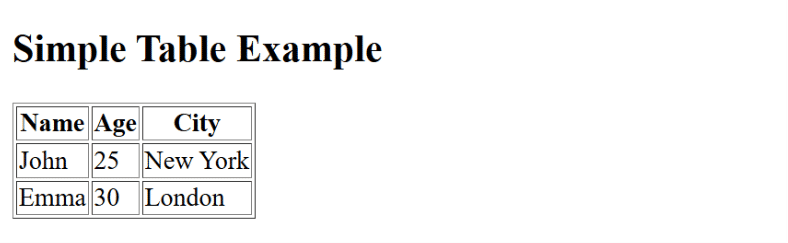
Complete HTML example demonstrating <tr>, <td>, and <th>:
<!DOCTYPE html>
<html lang="en">
<head>
  <meta charset="UTF-8">
  <meta name="viewport" content="width=device-width, initial-scale=1.0">
  <title>Table Example</title>
</head>
<body>

<h2>Simple Table Example</h2>

<table border="1">
  <tr>
    <th>Name</th>
    <th>Age</th>
    <th>City</th>
  </tr>
  <tr>
    <td>John</td>
    <td>25</td>
    <td>New York</td>
  </tr>
  <tr>
    <td>Emma</td>
    <td>30</td>
    <td>London</td>
  </tr>
</table>

</body>
</html>
Output :