Author
HTML attributes can either store custom information or represent true/false states. Category 3 covers both these types:
data-*)They follow the format: data-key="value".
These attributes are accessible via JavaScript, which makes them useful for dynamic interactions or storing metadata.
Example :
<div data-user="101" data-role="admin">
  User Info
</div>

<script>
  const div = document.querySelector('div');
  console.log(div.dataset.user); // Output: 101
  console.log(div.dataset.role); // Output: admin
</script>
Boolean attributes represent true/false states.
The presence of the attribute means true, and its absence means false.
Commonly used in form elements and interactive components.
Example :
<input type="checkbox" checked>| Attribute | Used On | Meaning when present |
|---|---|---|
checked |
<input> |
Marks checkbox/radio as selected |
disabled |
All form elements | Disables the element |
readonly |
<input>, <textarea> |
Makes field uneditable |
required |
Form inputs | Input must be filled before submit |
autofocus |
<input>, <textarea> |
Automatically focuses on page load |
multiple |
<input type="file">, <select> |
Allows multiple selections |
selected |
<option> |
Marks option as selected |
hidden |
Any element | Hides the element from page |
controls |
<audio>, <video> |
Shows default playback controls |
loop |
<audio>, <video> |
Plays media repeatedly |
muted |
<audio>, <video> |
Starts media muted |
playsinline |
<video> |
Plays video inline instead of fullscreen |
<!DOCTYPE html>
<html lang="en">
<head>
  <meta charset="UTF-8">
  <title>Boolean Attributes Example</title>
</head>
<body>

<h2>Form Example</h2>
<form>
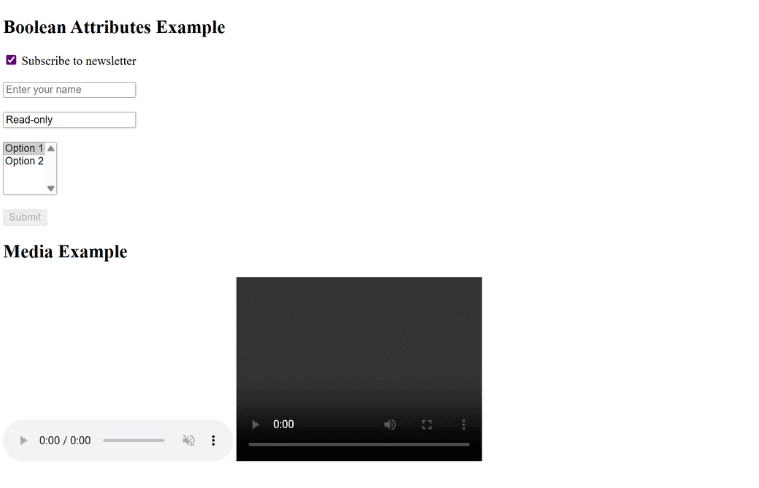
  <input type="checkbox" checked> Subscribe to newsletter<br><br>
  <input type="text" placeholder="Enter your name" required><br><br>
  <input type="text" value="Read-only" readonly><br><br>
  <select multiple>
    <option selected>Option 1</option>
    <option>Option 2</option>
  </select><br><br>
  <input type="submit" value="Submit" disabled>
</form>

<h2>Media Example</h2>
<audio controls loop muted>
  <source src="audio.mp3" type="audio/mp3">
  Your browser does not support the audio element.
</audio>

<video controls playsinline width="320" height="240">
  <source src="video.mp4" type="video/mp4">
  Your browser does not support the video tag.
</video>

</body>
</html>
Output :