

Website Performance Optimization Guide (2026)
Introduction
Nobody likes a slow website.
If a website takes too long to load, most users leave within a few seconds. A slow website not only creates a poor user experience, but also affects SEO rankings, conversions, and overall business growth.
In today’s digital world, website speed has become an important part of modern web development and search engine optimization.
That’s why website performance optimization is essential for every website owner, developer, and business.
In this guide, you will learn simple and practical ways to improve website speed and overall performance in 2026.
What is Website Performance Optimization?
Website performance optimization means improving a website so it loads faster and works smoothly for users.
It includes optimizing different areas such as:
Page loading speed
Images and media files
Frontend performance
Server response time
Mobile responsiveness
The main goal is to create a faster, smoother, and more user-friendly website experience.
A fast website not only improves user satisfaction, but also helps perform better in search engine rankings.
Why Website Performance Matters
Website speed plays a very important role in both user experience and SEO.
People expect websites to load quickly. If a site feels slow, many users leave immediately and may never return again.
A fast website provides many benefits:
Better user experience
Improved Google rankings
Higher conversion rates
Lower bounce rate
Better mobile performance
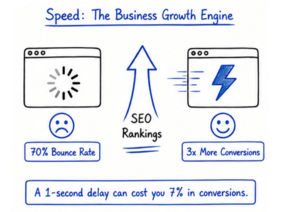
Google also considers website speed as an important ranking factor through Core Web Vitals.
Faster websites usually keep visitors engaged for a longer time and improve overall website performance.
Measure Website Speed First
Before optimizing your website, you should first analyze its current performance.
Performance testing helps identify the main issues that are slowing down your website.
Some popular website speed testing tools are:
Google PageSpeed Insights
Lighthouse
GTmetrix
WebPageTest
These tools help detect problems like:
Slow-loading resources
Large image files
Render-blocking scripts
Performance bottlenecks
After checking the report, you can start improving the most important areas step by step.
You cannot properly optimize a website without measuring its performance first.
Optimize Images
Large image files are one of the biggest reasons behind slow website loading speed.
If images are not optimized properly, they can increase page size and affect overall site performance.
Best Practices
Compress images before uploading
Use modern formats like WebP or AVIF
Enable lazy loading
Use proper image dimensions
For example, WebP images are usually much smaller and faster than traditional PNG or JPEG files.
Optimized images improve loading speed, user experience, and mobile performance.
Minify CSS, JavaScript & HTML
Minification removes unnecessary spaces, comments, and extra characters from CSS, JavaScript, and HTML files.
This helps reduce file size and improves loading speed.
Benefits
Smaller file sizes
Faster download speed
Better overall performance
Common Tools
CSSNano
Terser
HTML Minifier
Smaller files load faster in browsers and help improve website speed.
Reduce HTTP Requests
Every image, CSS file, JavaScript file, font, or external resource creates an HTTP request.
Too many requests can slow down website loading speed.
Improve Performance By:
Removing unused plugins and files
Combining CSS and JavaScript files
Limiting external libraries
Reducing unnecessary fonts and icons
Reducing HTTP requests helps browsers load websites faster and more efficiently.
Use Browser Caching
Browser caching stores static website files on the user’s device temporarily.
When users revisit the website, files like:
Images
CSS files
JavaScript files
do not need to be downloaded again from the server.
This reduces loading time and improves repeat visit speed.
Browser caching also helps reduce server load and bandwidth usage.
Use a CDN (Content Delivery Network)
A CDN (Content Delivery Network) stores website files on multiple servers located in different parts of the world.
When someone visits your website, the CDN delivers content from the server closest to the user’s location. This helps reduce loading time and improve website speed.
Popular CDNs:
Cloudflare
AWS CloudFront
Fastly
Benefits:
Faster global content delivery
Reduced latency
Better scalability and performance
CDNs are especially useful for websites that receive traffic from multiple countries.
Optimize Server Performance
Frontend optimization alone is not enough because backend server performance also affects website speed.
Even a well-designed frontend can feel slow if the server response time is high.
Improve Server Performance By:
Using fast and reliable hosting
Enabling Gzip or Brotli compression
Optimizing database queries
Using caching systems
Reducing API response time
A faster server improves loading speed, stability, and overall website performance.
Improve Frontend Rendering
Modern websites often become slow because of large JavaScript files, heavy frameworks, and unnecessary scripts.
Improving frontend rendering helps browsers display website content faster and more smoothly.
Best Practices
Use lazy loading
Implement code splitting
Use async or defer scripts
Remove unused CSS and JavaScript
Reduce DOM complexity
Cleaner frontend code creates a smoother and faster user experience.
Optimize for Mobile Devices
Today, most users browse websites using smartphones and tablets. That’s why mobile optimization is extremely important.
A mobile-friendly website should:
Load quickly
Use responsive design
Have optimized assets
Avoid heavy animations and effects
A fast mobile website improves user experience and also helps with better SEO rankings.
Common Website Performance Mistakes
Many websites become slow because of common optimization mistakes.
Some of the most common issues are:
Uploading very large images
Using too many plugins
Loading unnecessary JavaScript files
Ignoring browser caching
Using slow hosting services
Blocking render scripts
Even small mistakes can negatively affect loading speed and user experience.
Website Performance Optimization Checklist
Before launching a website, make sure you:
Optimize images properly
Minify CSS and JavaScript files
Enable browser caching
Use a CDN
Reduce unnecessary HTTP requests
Improve mobile responsiveness
Test website speed regularly
Following these basic practices can significantly improve website speed and overall performance.
Final Thoughts
Website performance optimization is not only about making a website faster — it is also about creating a smooth and better experience for users.
A fast website can improve SEO rankings, user engagement, conversions, and overall business growth.
Small optimization improvements can make a website faster, smoother, and more user-friendly over time.
❓ Frequently Asked Questions (FAQs)
1. What is website performance optimization?
Website performance optimization is the process of making a website load faster and work smoothly. It includes improving images, code, server speed, and overall page performance.
2. Why is website speed important for SEO?
Website speed is important because Google uses it as a ranking factor. Faster websites rank better, provide a better user experience, and reduce bounce rates.
3. What are the main factors that slow down a website?
Common factors include large images, unoptimized code, slow hosting, too many scripts, and high server response time. These issues make websites load slowly.
4. How can I improve website loading speed?
You can improve speed by compressing images, using a CDN, enabling caching, minifying CSS and JavaScript, and removing unnecessary plugins or scripts.
5. What tools can I use to check website speed?
Popular tools include Google PageSpeed Insights, Lighthouse, GTmetrix, and WebPageTest. These tools help you find performance issues and fix them.
6. Does image optimization really improve website performance?
Yes, image optimization is very important. Using compressed formats like WebP and enabling lazy loading can significantly improve website loading speed.