

MCP (Model Context Protocol) Explained for Beginners (2026 Guide)
What is MCP (Model Context Protocol)?
Modern AI can answer questions, write code, and automate tasks. However, it cannot directly access your files, APIs, databases, or business applications without permission.
Model Context Protocol (MCP) is an open standard that allows AI applications to securely connect with external tools through a common communication protocol. Instead of building separate integrations for every AI application, developers can build one MCP server that works with multiple MCP-compatible AI clients.
Think of MCP as a USB-C for AI. It provides one standard way for AI models to communicate with different tools and services.
With MCP, AI can:
Access files and databases
Connect to APIs
Work with tools like GitHub, Google Drive, Slack, and Notion
Automate real-world tasks
Why Was MCP (Model Context Protocol) Created?
Before Model Context Protocol (MCP), AI applications used different methods to connect with external tools and services. This made integrations difficult to build, maintain, and scale.
Some of the biggest challenges were:
Duplicate development for the same integrations
Higher maintenance costs
Poor scalability as new AI applications were added
Different authentication and integration methods
Vendor lock-in with specific AI platforms
MCP solves these challenges by providing a single, standardized communication protocol for AI applications.
Problems Before MCP (Model Context Protocol)
Without Model Context Protocol (MCP), every AI application needed separate integrations for each external tool. As more AI models and services were added, the number of integrations increased quickly.
AI Assistant A
 ├── GitHub Integration
 ├── Google Drive Integration
 └── Database Integration

AI Assistant B
 ├── GitHub Integration
 ├── Google Drive Integration
 └── Database Integration

AI Assistant C
 ├── GitHub Integration
 ├── Database Integration
 └── Internal API Integration
This approach created several problems:
Duplicate Development – The same integrations had to be built multiple times.
Difficult Maintenance – API changes required updates across multiple integrations.
Poor Scalability – Every new AI application needed new integrations.
Higher Development Costs – More time and resources were required.
Vendor Lock-in – Many integrations worked only with a specific AI platform.
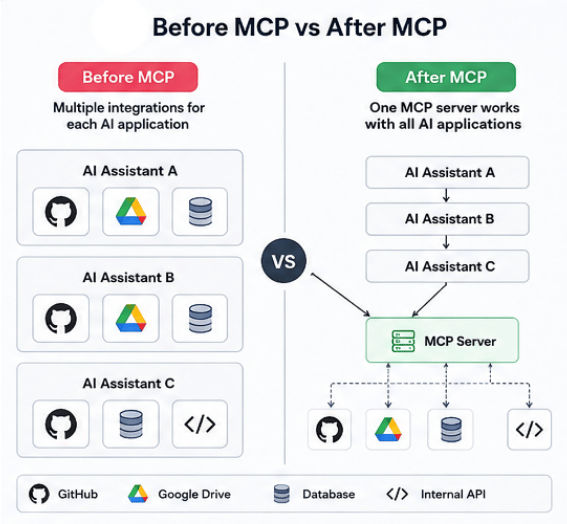
These challenges made AI development slower and more complex. MCP solves this by providing one standard way for AI applications to connect with external tools and services.
What is Context in AI?
In AI, context means all the information an AI uses to understand a user’s request and give a relevant answer.
Without proper context, an AI only relies on its training data and current chat. This is not enough for real-world tasks that need external data.
For example:
“Summarize my latest GitHub pull requests”
“Find my sales report in Google Drive”
These tasks need access to external systems, which AI cannot reach by default.
Where Context Comes From
User messages
Previous chat history
Uploaded files
APIs and databases
Local system files
Business tools and apps
Tool or system outputs
MCP (Model Context Protocol) helps AI safely access this external context so it can give more accurate and useful results.
What is a Protocol?
A protocol is a set of rules that defines how two systems communicate and share data.
Examples:
HTTP – communication between browsers and websites
SMTP – sending emails
FTP – transferring files
MCP (Model Context Protocol)
MCP is a standard protocol that allows AI systems to connect with external tools, APIs, databases, and apps in a consistent way.
Instead of building separate integrations for every tool, MCP provides one standard method. This makes AI systems:
Easier to build
More secure
More scalable
Easier to maintain
In simple words: MCP helps AI access the right context from external systems in a structured and safe way.
How Does MCP (Model Context Protocol) Work?
The Model Context Protocol (MCP) allows AI applications to securely connect with external tools using a standard process. Instead of building separate integrations for each service, AI uses MCP as a bridge.
Here’s a simple step-by-step flow:
Step 1: User Sends a Request
A user asks something like:
“Show me my GitHub pull requests from this week.”
Step 2: AI Understands the Need
The AI checks the request and decides whether external data is required. If yes, it selects the right MCP connection.
Step 3: MCP Connects to External Tool
The MCP client sends the request to an MCP server, which connects securely to services like GitHub, Google Drive, databases, or APIs.
Step 4: Data is Returned
The external tool sends the data back to the MCP server, which formats it into a standard structure.
Step 5: AI Responds
The AI uses this data to generate a clear and accurate response for the user.
MCP Architecture
A typical Model Context Protocol (MCP) architecture consists of four main components that work together to help AI applications securely communicate with external tools and services.
                    User
                      │
                      ▼
                    Host
                      │
                      ▼
              AI Language Model
                      │
                      ▼
                 MCP Client
                      │
════════════════════ MCP ════════════════════
                      │
                      ▼
                 MCP Server
          ┌──────────┼──────────┐
          │          │          │
      GitHub      Database   Google Drive
          │          │          │
          └──────────┼──────────┘
                     ▼
               Final Response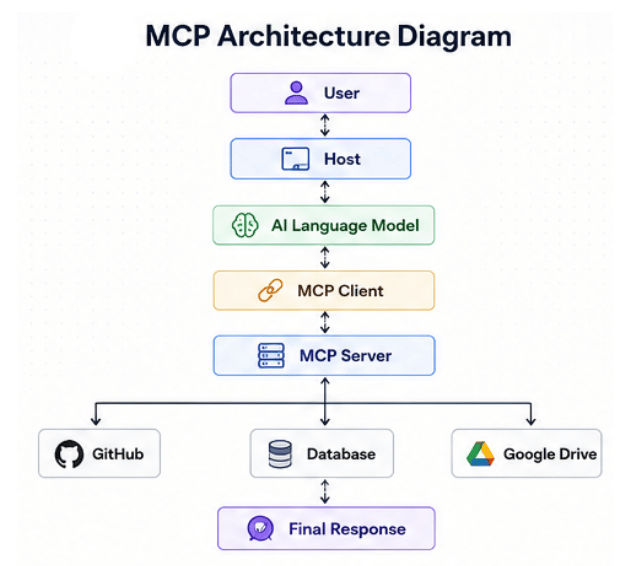
Each component has a specific role in the communication process. Understanding this architecture makes it easier to see how MCP enables AI models to access external tools securely and efficiently.
Host, Client, and Server Explained (MCP)
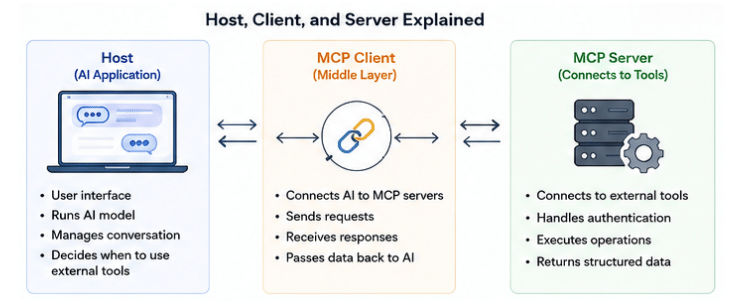
In Model Context Protocol (MCP), three main parts work together: Host, MCP Client, and MCP Server. These components allow AI systems to connect with external tools in a structured and secure way.
What is a Host?
The Host is the main AI application where users interact with the system.
It handles the conversation and decides when external tools are needed to complete a task.
Examples: Claude Desktop, Cursor, VS Code, and other AI apps.
The Host:
Receives user input and starts the process
Runs the AI model
Keeps the conversation organized
Loads and manages MCP connections when needed
What is an MCP Client?
The MCP Client is the middle layer that helps the AI talk to external tools.
When the AI needs data, the client sends the request and brings back the response in a standard format.
The MCP Client:
Connects the AI to MCP servers
Sends requests to external tools
Waits for and receives responses
Passes the data back to the AI so it can continue working
What is an MCP Server?
The MCP Server is the system that actually connects to external services like APIs and databases.
It handles communication in the background and makes sure the data is returned in a clean and usable format.
The MCP Server:
Connects with tools like GitHub, databases, and Google Drive
Manages authentication and secure access
Executes the requested operations
Sends structured data back to the client
Resources and Tools in MCP (Model Context Protocol)
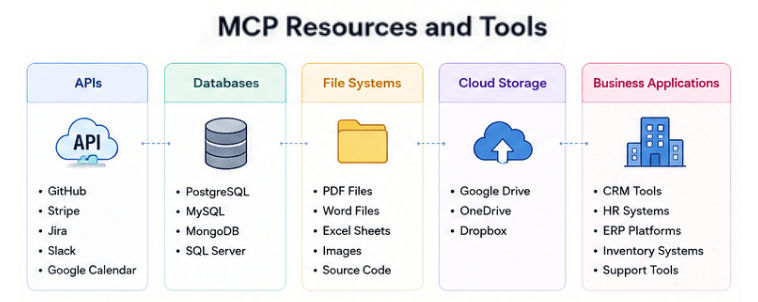
An MCP Server can connect AI applications with different types of tools and data sources. This helps AI retrieve information or perform actions in a secure and controlled way.
APIs
MCP can connect to popular external services and APIs like:
GitHub
Stripe
Jira
Slack
Google Calendar
These are used to fetch data or trigger actions inside those platforms.
Databases
AI can access structured data stored in databases such as:
PostgreSQL
MySQL
MongoDB
SQL Server
This helps in searching records, analytics, and real-time data access.
File Systems
With proper permissions, MCP can read local files like:
PDF documents
Word files
Excel sheets
Images
Source code
Cloud Storage
It can also connect to cloud storage services like:
Google Drive
OneDrive
Dropbox
This makes it easy to access and manage stored files.
Business Applications
Companies can build custom MCP servers to connect AI with internal systems such as:
CRM tools
HR systems
ERP platforms
Inventory systems
Customer support tools
MCP Communication Flow
The diagram below shows how Model Context Protocol (MCP) connects an AI application with an external tool to retrieve real-time information.
User
 │
 ▼
Host
 │
 ▼
AI Model
 │
 ▼
MCP Client
 │
 ▼
MCP Server
 │
 ▼
External Tool
 │
 ▼
MCP Server
 │
 ▼
AI Model
 │
 ▼
Host
 │
 ▼
User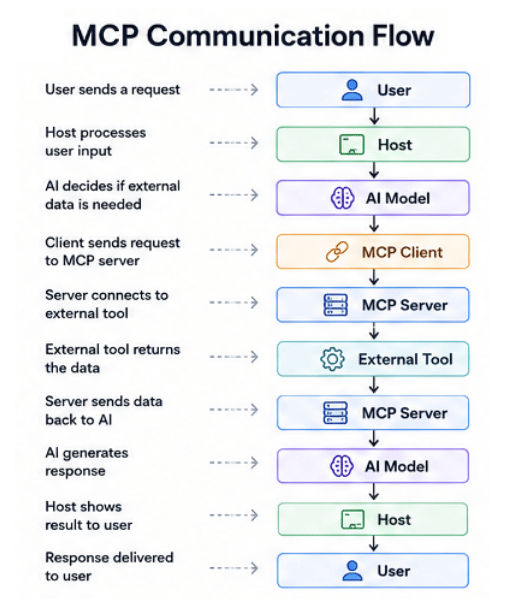
MCP enables AI to fetch real-time information from external systems and deliver accurate, up-to-date responses seamlessly.
Real-World Examples of MCP (Model Context Protocol)
Here are simple but slightly detailed real-world uses of Model Context Protocol (MCP):
GitHub: AI can connect to GitHub and review pull requests, summarize code changes, and help developers understand what was modified in a project.
Database: AI can fetch live data from databases like MySQL or PostgreSQL, such as total sales, user activity, or analytics for a specific time range.
Docs: AI can search through documents (PDFs, Word files, internal notes), find the right file, and quickly summarize important information.
Tools (Slack, Jira, Drive): AI can automate workflows like creating Jira tickets, sending Slack messages, or saving meeting notes to Google Drive without manual work.
MCP vs Traditional APIs
Traditional APIs | MCP |
|---|---|
Designed mainly for communication between two applications or services | Designed specifically for AI systems to connect with external tools and data sources |
Every integration is usually built separately for each service | Uses a single standard protocol for all tool integrations |
Developers must handle different API formats and rules for each service | Follows a consistent communication structure across all tools |
Requires more setup and custom code for every new integration | Reduces development effort by reusing the same MCP connection model |
Maintaining multiple integrations can become complex over time | Easier to maintain because everything follows one standard approach |
Mainly focused on request/response API communication | Can connect AI with APIs, files, databases, and full applications |
MCP vs Function Calling
Function Calling | MCP |
|---|---|
Works with a fixed set of predefined functions defined by the developer | Works with complete external tools exposed through MCP servers |
Usually limited to one AI platform or provider | Designed as an open standard usable across different AI systems |
Developer must manually define each function and its behavior | Tools are exposed once through MCP servers and reused easily |
Best suited for simple or small-scale AI features | Better suited for large-scale, production-level AI systems |
Implementation depends on the AI provider (like OpenAI, etc.) | Platform-independent and works across different AI clients |
Focuses mainly on calling functions inside an application | Supports deeper integration with tools, files, databases, and services |
Benefits of MCP (Model Context Protocol)
Model Context Protocol (MCP) offers several benefits for developers and organizations building AI-powered applications.
1. Standardized Communication: MCP provides a common communication standard, making AI integrations more consistent and reliable.
2. Build Once, Use Everywhere: Developers can build one MCP server and reuse it across multiple MCP-compatible AI applications, saving time and effort.
3. Better Scalability: New AI applications can connect to existing MCP servers without creating new integrations from scratch.
4. Easier Maintenance: When an external API changes, developers usually only need to update the MCP server instead of every AI application.
5. Improved Security: The MCP server manages authentication and permissions, helping protect access to external tools and data.
6. Better Developer Experience: With one standard protocol, developers spend less time managing integrations and more time building AI applications.
Limitations of MCP (Model Context Protocol)
While Model Context Protocol (MCP) offers many advantages, it also has a few limitations to consider.
1. Still an Emerging Standard: MCP is a relatively new technology, so not all AI applications and platforms support it yet. However, adoption is growing rapidly.
2. Initial Setup: Setting up an MCP server requires technical knowledge, which may be unnecessary for small or simple projects.
3. Dependency on External Services: If a connected API, database, or service is unavailable, the AI may not be able to complete the requested task.
4. Authentication and Permissions: Connecting AI to business systems requires secure authentication and proper permission management to protect sensitive data.
5. Performance Depends on External Tools: The response time of an AI application also depends on the speed of the connected APIs, databases, or other external services.
Common Use Cases of MCP (Model Context Protocol)
Model Context Protocol (MCP) connects AI with real tools, data, and systems, making it useful in many real-world applications.
1. AI Coding Assistants: AI can access GitHub, project files, and docs to understand code, find bugs, and suggest improvements.
2. Enterprise AI: Businesses connect AI with CRM, ERP, and internal systems so users can quickly access reports and documents using natural language.
3. Customer Support: AI can fetch customer data, orders, and tickets from multiple systems to give fast and accurate support answers.
4. Business Automation: AI automates tasks like sending emails, creating tickets, updating records, and managing workflows across tools.
5. Data Analysis: AI connects to databases to generate real-time reports, sales insights, and dashboards.
6. Knowledge Management: AI searches and summarizes documents to quickly find important information from large data systems.
7. Personal Productivity: AI helps manage emails, calendars, notes, and files to improve daily productivity.
Future of MCP (Model Context Protocol)
Model Context Protocol (MCP) is still evolving, but it is quickly becoming an important standard for connecting AI with real-world tools and systems.
1. Smarter AI Agents
Future AI agents will handle complex workflows by using multiple tools like email, calendars, databases, and business apps. MCP provides the structure needed for this smooth coordination.
2. Enterprise Adoption
More companies will use MCP to connect AI with internal systems. This reduces custom integration work and makes automation easier at scale.
3. Better Developer Experience
Developers can build one MCP server and reuse it across many AI applications. This saves time and simplifies maintenance.
4. Growing Ecosystem
As MCP grows, more ready-to-use servers will be available for tools, cloud platforms, and databases, making AI integrations faster and easier.
5. Multi-Agent Systems
Future AI systems will use multiple agents working together. MCP can act as a common communication layer between these agents and external tools.
Should You Learn MCP?
If you want to build modern AI applications or AI agents, then learning Model Context Protocol (MCP) is a good step. It helps you understand how AI connects with external tools, APIs, databases, and real systems in a secure way.
MCP is useful for:
AI Engineers
Software Developers
Backend Developers
Full-Stack Developers
Machine Learning Engineers
DevOps Engineers
Solution Architects
Automation Engineers
Even if you are a beginner, understanding MCP basics will help you stay ready for modern AI development.
Frequently Asked Questions (FAQs)
What is MCP in AI?
MCP (Model Context Protocol) is an open standard that helps AI applications connect securely with external tools like APIs, databases, file systems, and business apps using a single communication format.
Who created MCP (Model Context Protocol)?
Model Context Protocol (MCP) was introduced by Anthropic as an open standard. It allows developers to build compatible AI tools and integrations across different systems.
Is MCP (Model Context Protocol) open source?
MCP is an open standard, which means developers can build and use MCP clients and servers freely without being locked into one platform.
Does MCP replace APIs?
No. MCP does not replace APIs. Instead, it works on top of them and provides a standard way for AI systems to use APIs more easily and consistently.
What is the difference between MCP Client and MCP Server?
The MCP Client sends requests from the AI application, while the MCP Server connects to external tools, fetches data, and returns results in a structured format.
Can beginners learn MCP (Model Context Protocol)?
Yes. Anyone with basic knowledge of AI, APIs, or software development can start learning MCP. It is designed to simplify AI integrations.
Is MCP only used with LLMs?
No. While MCP is commonly used with Large Language Models (LLMs), it can be used with any AI system that needs access to external tools or data.
Why is MCP (Model Context Protocol) important?
MCP makes AI integrations simpler by using one standard way to connect with tools and systems. It reduces development effort and makes AI applications easier to scale.
Conclusion
Model Context Protocol (MCP) is transforming how AI applications connect with external tools, APIs, databases, and business systems. By providing a standardized communication protocol, MCP makes AI integrations simpler, more secure, and easier to scale.
As AI agents and intelligent applications become more common, understanding Model Context Protocol will become an essential skill for developers. Whether you're building AI-powered software or just exploring modern AI technologies, learning MCP today will help you prepare for the future of AI development.