

How to Build a Developer Portfolio That Gets You Hired (Complete Guide)
Introduction: Why Every Developer Needs a Portfolio
A resume tells recruiters what you know, but a developer portfolio shows what you can actually build. That's why it has become one of the most important tools for developers looking for internships, freelance work, or full-time jobs.
Your portfolio highlights your projects, technical skills, and problem-solving ability through real work instead of just listing technologies.
Whether you're a student, a fresher, or an experienced developer, a well-built portfolio can help you stand out and create better career opportunities.
What Is a Developer Portfolio?
A developer portfolio is your online showcase where you display your skills, projects, and experience. It gives recruiters and clients a clear idea of what you can build and the technologies you work with.
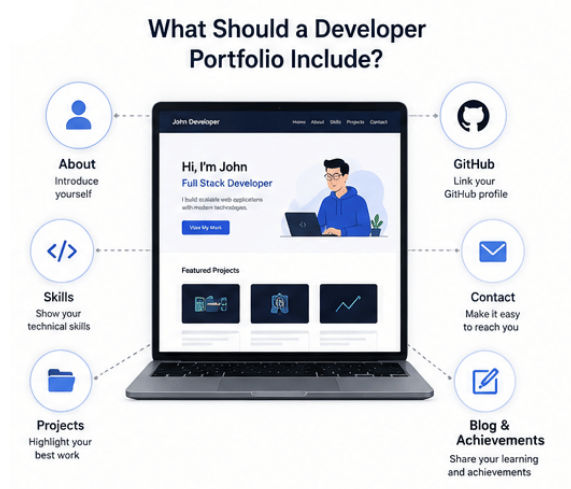
A good developer portfolio usually includes:
About section
Technical skills
Projects
GitHub profile
Open-source contributions
Technical blogs
Certifications or achievements
Contact information
Unlike a resume, which lists your skills, a developer portfolio shows them through real projects.
For example:
A resume says:
"I know Java and Spring Boot."
A developer portfolio shows:
"I built a Spring Boot REST API with user authentication, MySQL integration, and cloud deployment."
This helps recruiters quickly understand your practical skills and development experience.
Why Do Developers Need a Portfolio?
1. A Portfolio Shows What You Can Actually Build
Anyone can list skills like Java, Python, React, or Spring Boot on a resume, but recruiters want proof.
A developer portfolio shows how you've used those skills in real projects.
For example, instead of writing:
"Knowledge of backend development"
Your portfolio can show:
Built a REST API using Spring Boot
Added JWT authentication
Connected a MySQL database
Deployed the application to the cloud
Real projects build more trust than a list of technologies.
2. Helps Freshers Stand Out
If you're a student or fresher, a portfolio can showcase your skills even without work experience.
Include:
Personal projects
Technical skills
Learning journey
Problem-solving ability
You don't need dozens of projects. Three to five quality projects with clear explanations are enough to make a strong impression.
3. Builds Your Online Presence
A developer portfolio brings everything together in one place, including your:
GitHub profile
LinkedIn profile
Technical blogs
Open-source contributions
Projects
This makes it easy for recruiters and clients to explore your work and understand your skills.
What Should a Developer Portfolio Include?
A good developer portfolio should help recruiters quickly understand your skills, experience, and the projects you've built.
Here are the key sections every developer portfolio should include.
1. About Section
The About section is your introduction. Keep it short and explain who you are, what you work on, and your career goals.
Include:
Your name
Developer role
Technologies you use
Career goals
Areas of interest
Example:
"I am a Java Backend Developer specializing in Spring Boot, REST APIs, and cloud-based applications. I enjoy building scalable software solutions and learning modern technologies."
2. Skills Section
Show the technologies you can confidently work with. Instead of listing everything you've learned, focus on your strongest skills.
Group them into categories.
Backend
Java
Spring Boot
REST APIs
Microservices
MySQL
Frontend
HTML
CSS
JavaScript
React
Cloud & DevOps
Docker
AWS
CI/CD
GitHub Actions
3. Projects Section (Most Important)
Your projects are the most important part of your portfolio because they prove your skills.
For each project, include:
Project Name
Use a clear and descriptive name.
Problem Statement
Briefly explain:
What problem does it solve?
Why did you build it?
Technology Stack
Mention the technologies you used.
Example: Java, Spring Boot, MySQL, Docker, AWS
Key Features
Highlight features like:
User authentication
REST APIs
Database management
Payment integration
AI features
Screenshots or Live Demo
Show how the project works with screenshots or a live demo.
GitHub Repository
Add the project repository with:
Clean code
README
Setup instructions
Documentation
4. GitHub Profile
Your GitHub profile helps recruiters see your coding skills and project history. Keep your repositories organized, write clear README files, and pin your best projects.
5. Contact Section
Make it easy for recruiters to contact you.
Include:
Email
LinkedIn
GitHub
Portfolio website (if available)
A simple contact form is also a good option.
6. Blog or Achievements
If you've written technical blogs, earned certifications, contributed to open source, or participated in coding competitions, include them here. It shows you're actively learning and improving your skills.
Choose the Right Projects for Your Portfolio
The projects in your portfolio should match your skills and career goals. A few well-built projects with real features are always better than many basic ones.
Beginner Projects
Personal Blog Website
A personal blog is a great beginner project that helps you improve your frontend skills while creating your own online presence.
You'll get hands-on experience with:
HTML, CSS, and JavaScript
Responsive web design
Content management
Website deployment
You can make it even better by adding user login, comments, or categories.
Weather Application
A weather app is a beginner-friendly project that teaches you how to work with APIs and display real-time data.
You'll work with:
API integration
JavaScript
Data handling
UI development
Todo Application
A Todo app is a simple project, but adding useful features can make it much more impressive.
You'll practice:
CRUD operations
Application logic
Database integration
UI development
You can also add authentication, reminders, or cloud sync to make it stand out.
Expense Tracker
An expense tracker is a practical project that helps you understand how real applications manage user data.
You'll learn:
Data management
Database operations
Business logic
User experience
Java Developer Projects
If you're targeting Java backend roles, choose projects that highlight your Spring Boot, REST API, and database skills.
E-commerce Backend
An e-commerce backend is one of the best portfolio projects for Java developers.
This project includes:
Spring Boot
REST APIs
Database design
User authentication
Backend architecture
Banking Management System
This project helps you build secure applications with real business logic.
It covers:
Object-oriented programming
Transaction handling
Security concepts
Database management
Employee Management System
A practical CRUD project based on real business requirements.
It includes:
CRUD operations
Database integration
REST APIs
Backend development
Adding role-based authentication can make this project even stronger.
REST API Project
A REST API project is a simple but effective way to showcase backend development.
It covers:
API design
Database communication
Backend architecture
Deployment
Full Stack Developer Projects
Full stack projects show that you can build complete applications, from the user interface to the backend and database.
Job Portal Application
A job portal combines multiple real-world features in one project.
It can include:
User authentication
Job posting
Search and filters
User profiles
Application tracking
Learning Management System
A learning platform is another strong full stack project.
It can include:
Course management
Student dashboards
Content management
Progress tracking
Social Media Application
A social media app is a great way to showcase advanced full stack development skills.
It can include:
User profiles
Posts and comments
Notifications
Real-time messaging or updates
Projects like these show recruiters that you can build complete, real-world applications and work with modern development technologies.
AI Projects for Modern Developer Portfolios
AI skills are in high demand, and adding AI projects to your developer portfolio can help you stand out. These projects show that you can work with modern tools, integrate AI into applications, and solve real-world problems.
The good news is that you don't need to build a complex AI system. Even a small, well-built project can make a strong impression.
Here are some AI project ideas to consider.
AI Chatbot
An AI chatbot is one of the easiest and most popular AI projects for developers.
It showcases:
LLM integration
API usage
Conversational AI
User interaction
You can make it even better by adding chat history, document-based responses, or voice support.
RAG-Based Document Assistant
A RAG (Retrieval-Augmented Generation) application lets users upload documents and ask questions based on their content.
It showcases:
RAG implementation
Vector databases
AI-powered search
Document processing
This is a practical project because many businesses use RAG systems for knowledge search and internal support.
AI Resume Analyzer
An AI resume analyzer reviews resumes and provides useful feedback or improvement suggestions.
It showcases:
AI automation
Text processing
Natural language processing (NLP)
Real-world problem solving
AI Coding Assistant
An AI coding assistant helps developers write and improve code more efficiently.
It can include features like:
Code suggestions
Bug explanations
Code optimization
Documentation generation
This project showcases AI integration and developer productivity tools.
AI Agent Workflow
AI agents can complete tasks by using APIs, external tools, and different AI models.
Building an AI agent workflow showcases:
Agentic AI
Workflow automation
Tool integration
Multi-step task execution
Projects like AI chatbots, RAG applications, and AI agents show recruiters that you're learning modern technologies and building practical AI-powered solutions.
How to Optimize Your GitHub Profile for Your Portfolio
Your GitHub profile is an important part of your developer portfolio because it showcases your coding skills, projects, and development activity. Many recruiters check GitHub before scheduling interviews, so keeping it clean and well-organized can leave a strong first impression.
Here are a few simple ways to improve your GitHub profile.
Create Clear README Files
A good README helps visitors understand your project without reading the entire codebase.
Include:
What the project does
Technologies used
Installation steps
Key features
Screenshots or demo links (if available)
A clear README makes your projects look more professional and easier to understand.
Write Meaningful Commit Messages
Good commit messages show your development process and make your repository easier to follow.
Avoid messages like:
"Updated code"
"Fixed issue"
"Changes done"
Instead, write descriptive commits such as:
"Implemented JWT authentication for user login"
"Added database integration for user management"
"Created REST API endpoints for product operations"
Keep Your Repository Organized
A clean repository is easier for recruiters and other developers to explore.
Make sure every project has:
A clear folder structure
Proper documentation
Meaningful file names
Setup instructions
No unnecessary files
Well-organized repositories reflect good coding practices.
Contribute to Open Source
Contributing to open-source projects is a great way to strengthen your GitHub profile and gain real-world experience.
Even small contributions like fixing bugs, improving documentation, or adding new features show that you can work with existing codebases and collaborate with other developers.
Tip: If you're new to open source, check out our Open Source for Beginners guide to get started.
A well-maintained GitHub profile, combined with a strong portfolio, helps recruiters understand your skills and increases your chances of getting shortlisted.
Common Developer Portfolio Mistakes to Avoid
Even great projects can lose their impact if your portfolio isn't presented well. Here are some common mistakes to avoid.
1. Adding Too Many Basic Projects
Don't fill your portfolio with calculator apps or copied tutorial projects. Instead, showcase 3–5 quality projects that solve real problems.
2. Copying Tutorial Projects
If you follow a tutorial, add your own features, improve the design, or solve a different problem. This shows your creativity and understanding.
3. Poor Project Descriptions
Don't just share the code. Briefly explain:
What the project does
Technologies used
Key features
Challenges you solved
4. Broken Links
Before sharing your portfolio, make sure your GitHub links, live demos, and portfolio pages all work properly.
5. Poor Portfolio Design
Keep your portfolio clean, mobile-friendly, easy to navigate, and fast to load. A simple design always works better than an overly complex one.
Developer Portfolio vs Resume
Resume | Developer Portfolio |
|---|---|
Lists your skills | Shows your skills through projects |
Short summary | Detailed proof of your work |
Static document | Interactive website |
Focuses on education and experience | Focuses on projects and practical skills |
Mostly for job applications | Helps showcase your personal brand |
Updated occasionally | Can be updated regularly |
Tells what you know | Shows what you can build |
How to Build a Developer Portfolio Website
Building a developer portfolio doesn't have to be complicated. Follow these simple steps to create a portfolio that showcases your skills and projects.
Step 1: Choose a Technology
Pick a technology based on your skill level.
Beginners:
HTML
CSS
JavaScript
Intermediate/Advanced:
React
Next.js
Choose the one you're most comfortable with and keep the design clean.
Step 2: Add the Essential Sections
Your portfolio should include:
Home
About
Skills
Projects
Blog (Optional)
Contact
Keep the layout simple so recruiters can quickly find the information they need.
Step 3: Deploy Your Portfolio
Publish your portfolio using free hosting platforms like:
GitHub Pages
Netlify
Vercel
Once it's live, add the link to your resume, LinkedIn profile, and GitHub account.
Related: Check out our Free Deployment Platforms for Students guide to learn more.
Frequently Asked Questions (FAQs)
Do software developers need a portfolio?
Yes. A developer portfolio showcases your projects, coding skills, and practical experience, making it easier for recruiters to evaluate your work.
How many projects should a developer portfolio have?
Focus on 3–5 high-quality projects with clear descriptions, GitHub repositories, and live demos instead of adding many small projects.
Should beginners create a developer portfolio?
Absolutely. A portfolio helps beginners showcase their skills, personal projects, and learning journey, even without work experience.
Is GitHub enough as a developer portfolio?
No. GitHub is important, but a personal portfolio website presents your projects, skills, and experience in a more professional way.
What projects should I add to my developer portfolio?
Choose projects that solve real problems and showcase your technical skills. Include projects that use modern technologies, APIs, databases, or AI to demonstrate practical experience.
Conclusion
A strong developer portfolio helps recruiters see your skills through real projects, not just a list of technologies on your resume.
You don't need dozens of projects. A few quality projects, a well-maintained GitHub profile, and a clean portfolio website are enough to make a great impression.
Keep updating your portfolio as you learn new skills and build better applications. The more it reflects your latest work, the more valuable it becomes for job opportunities, freelance work, and career growth.