


If you are learning programming, an engineering student, or a college student looking for the best laptop for coding under ₹50,000, you are in the right place.
We have researched and selected the top 5 laptops for programming under ₹50,000 keeping in mind performance, future-proofing, build quality, and price.
These laptops are perfect for beginners and are capable of providing a smooth coding experience for the next 4–5 years.
Minimum Laptop Requirements for Programming
When choosing a laptop for programming, pay attention to these specifications:
- SSD: 512GB SSD (minimum 256GB acceptable)
- Processor: Intel Core i5 / AMD Ryzen 5 or better
- RAM: 8GB RAM (16GB is ideal for future use)
- Build Quality: Metal body preferred
- Weight: Lightweight is better for students
…can cause lag or slow performance.
For long-term use, these minimum specifications are recommended.
⚠️ You can still code on laptops with lower specs, but:
Heavy IDEs like Android Studio, IntelliJ, or VS Code Multiple browser tabs and tools Virtual machines
So keeping all this in mind, we recommend these 5 laptops to buy:
1. ASUS Vivobook 15
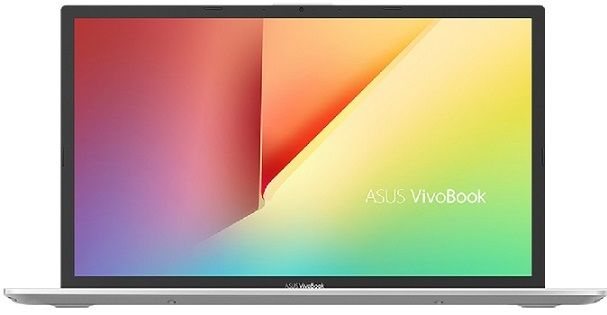
Specifications:
- Display: 15.6-inch Full HD
- Processor: AMD Ryzen 7
- RAM: 16GB
- Storage: 512GB SSD
- Graphics: Integrated
- Weight: 1.8 kg
- OS: Windows 11
- Fingerprint Sensor: Yes
- Battery: Up to 6 hours
? Price: ₹46,000 (Approx)
✅ Best for: Heavy programming, multitasking, future-proof laptop
2. Lenovo IdeaPad Slim
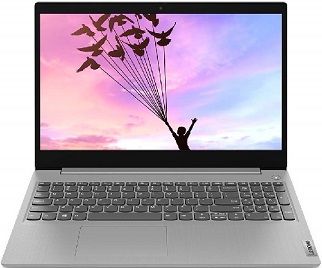
Specifications:
- Display: 15.6-inch
- Processor: Intel Core i3
- RAM: 8GB (Upgradeable to 16GB)
- Storage: 512GB SSD
- Graphics: Intel UHD
- Weight: 1.8 kg
- OS: Windows 11
- Battery: Up to 6 hours
? Price: ₹45,000 (Approx)
✅ Best for: Beginners, students starting coding
3. HP 14s
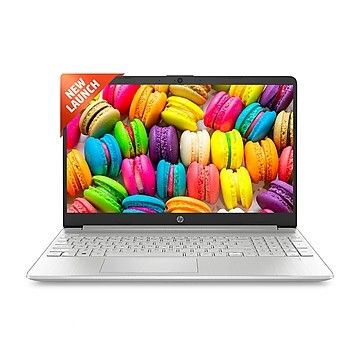 Specifications:
- Display: 14-inch Full HD
- Processor: AMD Ryzen 5
- RAM: 8GB
- Storage: 512GB SSD
- Graphics: Radeon Graphics
- Weight: 1.46 kg
- Keyboard: Backlit
- OS: Windows 11
? Price: ₹48,000 (Approx)
✅ Best for: Students, portability lovers, daily coding
4. HP15s
Specifications:
- Display: 15.6-inch
- Processor: Intel Core i5
- RAM: 8GB (Expandable to 16GB)
- Storage: 512GB SSD + 32GB Intel Optane
- Graphics: Intel Iris Xe
- Weight: 1.7 kg
- Extras: Numpad, Alexa built-in
- OS: Windows 11
? Price: ₹50,000 (Approx)
✅ Best for: Java, Python, Web Development, college projects
5.Dell Windows Inspiron 3515

Specifications:
- Display: 15.6-inch Full HD
- Processor: AMD Ryzen 5
- RAM: 8GB
- Storage: 512GB SSD
- Graphics: Vega Graphics
- Weight: 1.8 kg
- OS: Windows 11
? Price: ₹39,600 (Approx)
✅ Best for: Coding on a tight budget, value for money
? SSD vs HDD – What Should You Choose?
- SSD: Fast performance
- HDD: More storage
? Best combination:
- 256GB SSD + 1TB HDD
- SSD ensures fast boot and software load times
- HDD is ideal for storing projects and data
⚠️ Avoid SSDs smaller than 256GB, as they can slow down your system.
Final Verdict – Which Laptop Should You Buy?
? Best overall: ASUS VivoBook 15
? Best budget laptop: Dell Inspiron 3515
? Best lightweight: HP 14s
? Best Intel option: HP 15s
If you are serious about coding, always choose a laptop with at least 8GB RAM and SSD for smooth performance.
❓ FAQ – Best Laptops for Programming Under ₹50,000
1️⃣ Which is the best laptop for programming under ₹50,000 in India?
The ASUS VivoBook 15 is the best overall choice for programming. It offers a Ryzen 7 processor, 16GB RAM, and 512GB SSD, making it future-proof for coding and multitasking.
2️⃣ Can I code on a laptop with 8GB RAM and Intel i3/Ryzen 3?
Yes, you can code on laptops with 8GB RAM and entry-level processors. However, heavy IDEs like Android Studio or VS Code may run slowly, especially if you multitask. For smooth long-term performance, Intel i5 / Ryzen 5 or higher with SSD is recommended.
3️⃣ Is SSD necessary for programming laptops?
Yes. SSDs significantly improve boot times, software loading speed, and overall system performance. You can opt for a combination of 256GB SSD + 1TB HDD to balance speed and storage.
4️⃣ How much RAM is enough for programming?
- Minimum: 8GB RAM (suitable for basic coding and web development)
- Recommended: 16GB RAM (ideal for heavy IDEs, multiple projects, and long-term use)
5️⃣ Can I do software development on laptops under ₹50,000?
Absolutely! Laptops under ₹50,000, like the ones in our list, are sufficient for web development, Python, Java, C++, and even Android development. Just make sure the laptop has SSD, 8GB+ RAM, and a modern processor.
6️⃣ Which laptop is best for students and portability?
The HP 14s is lightweight (1.46 kg) and compact, making it ideal for college students, frequent travel, and coding on the go.
7️⃣ Can these laptops run heavy IDEs like Android Studio or IntelliJ?
Yes, laptops like ASUS VivoBook 15 and HP 15s can run heavy IDEs smoothly. Laptops with less than 8GB RAM or older processors might lag during heavy multitasking.
8️⃣ Is it better to buy Intel or AMD for programming?
Both Intel i5/i7 and AMD Ryzen 5/7 are excellent for programming. AMD Ryzen is generally better for multitasking and performance per price, while Intel offers good stability and software compatibility.