

Docker Explained for Beginners
Docker is one of the most important tools for developers, DevOps engineers, and cloud practitioners. Understanding Docker fundamentals is essential for learning containerization, modern microservices architecture, and cloud-native development.
Whether you are learning DevOps, backend development, or cloud computing, you will frequently encounter Docker. But what exactly is Docker, why is it so popular, and how can it help you deploy applications efficiently?
What Is Docker?
Docker is a containerization platform that allows developers to package applications along with all their dependencies into portable, lightweight containers.
A Docker container includes:
- Application code
- Runtime (Java, Node.js, Python, etc.)
- Libraries and dependencies
- Configuration files
In simple terms: Docker solves the “It works on my machine!” problem.
With Docker, your application runs consistently across:
- Developer machines
- Test and staging environments
- Production servers
- Cloud platforms
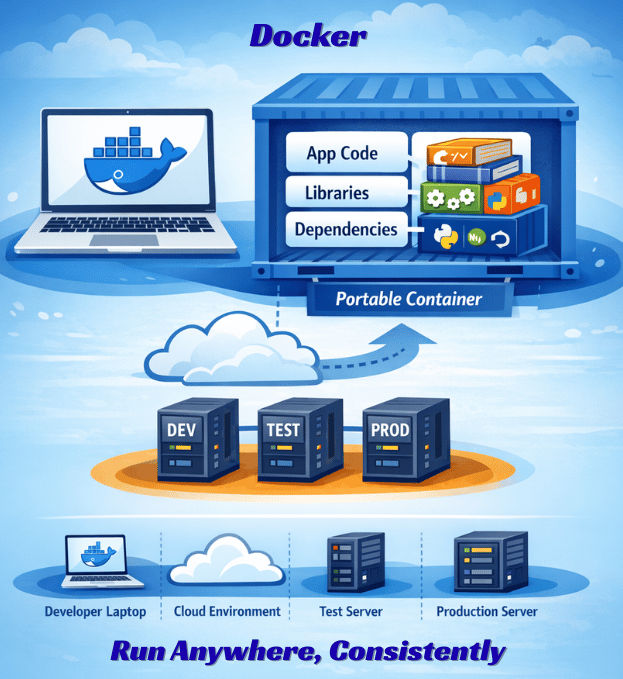
No extra setup or code modifications required.
Why Do We Need Docker?
Before Docker, developers faced common challenges:
- Different operating systems
- Conflicting library versions
- Deployment failures
- Inconsistent environments
For example, an app may work on your computer but fail on a server due to a different Node.js version or library conflict.
Docker solves this by packaging the app and all dependencies into a single container. The benefits include:
- Consistent environments across development and production
- Faster deployments
- Reliable releases
- Easier cloud scaling
Core Docker Fundamentals
To properly understand Docker fundamentals, you must clearly understand three core components:
- Docker Engine
- Docker Image
- Docker Container
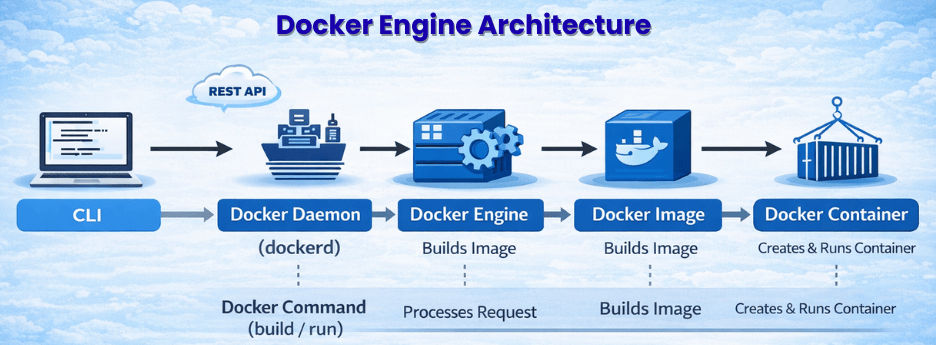
These three form the foundation of containerization.
1️⃣ Docker Engine
The Docker Engine is the runtime that builds, runs, and manages containers. It has three key parts:
- Docker Daemon (dockerd) – Background service managing containers and images
- Docker CLI – Command-line tool for Docker commands
- REST API – Communicates between CLI and Daemon
Commands like:
docker build
docker run
docker pull
The CLI sends instructions to the Docker Daemon through the REST API.
? In simple terms:
Docker Engine is the system that makes containers run.
2️⃣ Docker Image
A Docker image is a read-only template used to create containers. It contains:
- Application code
- Runtime (Java, Node, Python)
- Libraries and dependencies
- Configuration
Images are:
- Immutable – cannot be changed after creation
- Layer-based – each instruction adds a new layer
- Versioned – e.g.,
nginx:latest,openjdk:21
Example:
docker pull openjdk:21
Think of it as a blueprint. Containers are the actual running applications built from that blueprint.
3️⃣ Docker Container
A Docker container is a running instance of an image. It provides an isolated environment to run your application.
Example:
docker run -p 8080:8080 my-app
This starts a container from the my-app image and maps host port 8080 to container port 8080.
Containers are:
- Lightweight and fast
- Portable across environments
- Isolated from other applications
Stopped containers can be restarted or removed without affecting the original image.
Differences Between Docker vs Virtual Machines
| Feature | Docker Containers | Virtual Machines |
|---|---|---|
| Operating System (OS) | Share the host OS | Each VM runs its own OS |
| Size | Typically a few MBs | Usually several GBs |
| Boot Time | Seconds | Minutes |
| Performance | Near-native performance | Slight performance overhead |
| Resource Usage | Low; lightweight | High; requires more CPU & memory |
Containers are faster, smaller, and more efficient than virtual machines, making them ideal for microservices and cloud-native apps.
What Is a Dockerfile?
A Dockerfile is a text file that defines instructions for building a Docker image.
Example:
FROM openjdk:21
WORKDIR /app
COPY target/app.jar app.jar
ENTRYPOINT ["java","-jar","app.jar"]
Explanation:
FROM→ Base imageWORKDIR→ Working directoryCOPY→ Copy files into containerENTRYPOINT→ Command to start application
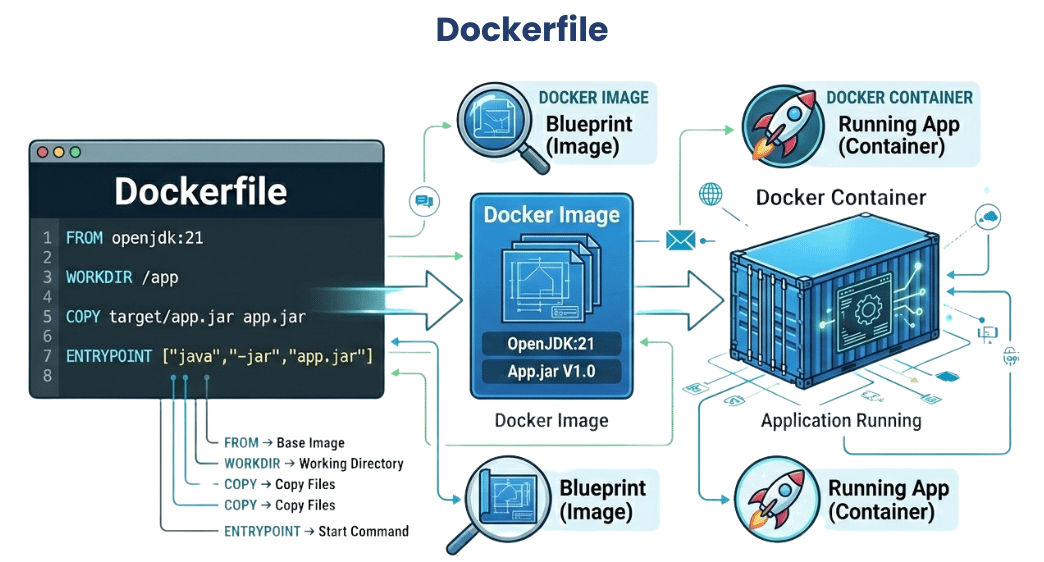
Dockerfiles ensure reproducible and consistent builds.
Running Containers with Custom Ports
Map host ports to container ports using -p:
Example:
docker run -p 9090:8080 springboot-app
Here:
- 9090 → Host port
- 8080 → Container internal port
Access the application at:
<http://localhost:9090>
This is useful when running multiple containers on the same host.
Docker Compose (Multi-Container Setup)
Docker Compose allows running multiple containers with a single YAML file. Ideal for apps requiring:
- Database
- Cache
- Message broker
Example:
docker-compose up
This starts all services, creates a network, and allows containers to communicate. Perfect for local development of microservices.
Why Docker Is Important for Microservices
Docker plays a critical role in modern microservices architecture.
It enables:
- Independent service deployment
- Technology flexibility
- Environment consistency
- Easy horizontal scaling
- Faster CI/CD pipelines
Each microservice runs in its own isolated container.
Best Practices for Docker
- Use lightweight base images (like Alpine)
- Use multi-stage builds
- Avoid running containers as root
- Use
.dockerignoreto reduce image size - Tag images properly (
v1.0.0instead oflatest) - Keep containers stateless
Basic Docker Commands for Beginners
docker --version
docker pull nginx
docker run nginx
docker ps
docker logs container_id
docker stop container_id
These commands are enough to get started.
Common Beginner Mistakes
- Confusing image vs container
- Ignoring networking
- Creating large image sizes
- Not using version tags
- Storing sensitive data inside images
Avoiding these mistakes improves production readiness.
Real-World Deployment Flow
Developer → Build App → Create Dockerfile → Build Image → Push to Registry → Deploy Container → Scale with OrchestratorIn cloud environments, Docker images are often deployed with Kubernetes, forming the backbone of:
- Cloud-native deployments
- CI/CD pipelines
- Automated scaling
- Consistent production environments
Why Learn Docker in 2026?
Docker remains one of the most in-demand DevOps skills because:
- Microservices adoption is growing
- Cloud-native architecture is the standard
- Kubernetes relies on containers
- DevOps and backend roles demand Docker expertise
Roles where Docker is essential:
- DevOps Engineer
- Cloud Engineer
- Backend Developer
- Platform Engineer
Conclusion
Docker fundamentals are critical for modern DevOps and microservices development.
By mastering:
- Images
- Containers
- Dockerfiles
- Networking
- Docker Compose
You can build portable, scalable, and production-ready applications confidently. Docker is not just a tool — it’s a foundational technology for 2026 and beyond.
Recommended Docker Video Tutorials (Hindi)
If you prefer learning Docker through practical demonstrations, the following Hindi tutorials can help you understand containerization, deployment, and real-world Docker use cases more easily.
? Docker Vs Kubernetes (Hindi)
https://youtu.be/qBbKgkaF9bo?si=LCB6LL8BWKyVPcDG
? Complete Docker Tutorial for Beginners (Hindi)
https://youtu.be/X3Wtjwu0vBI?si=nkPH2x0lbrrKvBjT
? Run AI Models Locally Using Docker (Hindi)
https://youtu.be/CRrPaEPKuAc?si=LPsSVkG0jRnhKRxr
? Virtual Machine vs Container Explained (Hindi)
https://youtu.be/Q9vTFB2Zym0?si=0MCnVPlBK5EORmAS
? Dockerizing React Application (Hindi)
https://youtu.be/Dlbx15qU9zE?si=YGoadP0RXX6O1rsG
? Dockerizing React with Nginx for Production (Hindi)
https://youtu.be/WOeSkyM9mRY?si=AkeJ0eirEq8MykT4